Web Scraping Agents: The AI-First Approach to Data Extraction
Discover how AI-first web scraping agents enhance data extraction, optimizing for efficiency and accuracy with advanced features.

A web scraping agent is a scraper built for consumption by an AI agent rather than a human dashboard: it fetches pages, strips boilerplate, and returns clean, token-optimized Markdown or JSON that a language model can reason over directly. The recommended approach in 2026 is agent-first tooling with a hybrid fetch strategy (fast static HTTP requests with automatic fallback to a headless browser only when a page demands it), production features like browser pools and proxy rotation baked in, and output formats designed for LLM context windows, not human eyeballs.
If you're evaluating options right now, skip the theory and run a single-page proof of concept first. Pick one target URL, one SDK or CLI, and measure three things before you commit to an architecture:
- How many tokens the cleaned output consumes versus raw HTML
- Whether the tool falls back to a browser automatically on JavaScript-heavy pages
- How it reports failure (a 403, a CAPTCHA wall, a timeout) instead of silently returning garbage
That fifteen-minute test tells you more than any AI search engine checker comparison chart.
Key Takeaways
Agent-first web scraping succeeds when hybrid fetch, token-optimized output, and resumable production infrastructure all work together instead of being solved separately.
| Point | Details |
|---|---|
| Hybrid fetch controls cost | Try static HTTP first and fall back to a headless browser only when the page requires rendering. |
| Token optimization is the biggest quality lever | Stripping boilerplate before content reaches an LLM can remove 80 to 90 percent of tokens without losing signal. |
| Design for visible failure | Surface non-2xx responses and CAPTCHA walls explicitly so agent logic can reroute instead of ingesting garbage. |
| Stealth and proxies are best-effort | Combine fingerprint hardening with residential proxies for sensitive targets, but expect occasional blocks regardless. |
| Orchestration closes the loop | agent-swarm assigns scraping tasks to isolated workers with persistent memory, so results and retries route automatically. |
Table of Contents
- Core Features Modern Web Scraping Agents Must Provide
- Production Architecture: Scaling, Reliability, and Resource Management
- Anti-Bot, Proxies, and Stealth: Practical Techniques and Realistic Limits
- Integrating Scraping Agents With AI Agents and LLM Pipelines
- How to Choose and Deploy a Web Scraping Agent
- How agent-swarm.dev Supports Agent-First Scraping Workflows
- What the Conventional Scraping Advice Gets Wrong
- Put Your Scraped Data to Work With agent-swarm
- Authoritative Docs and Examples to Start a PoC
- Sources
- FAQ
Core Features Modern Web Scraping Agents Must Provide
Most scraping failures in agent pipelines trace back to a tool built for the wrong consumer. A scraper designed for a human analyst optimizes for completeness. A scraper designed for an LLM optimizes for signal density per token, and that changes the engineering priorities entirely.
Four capabilities separate agent-ready tools from legacy scraping libraries:
- Hybrid fetch as the default, not an add-on. The agent should attempt a plain HTTP request first and only spin up a headless browser when the response indicates JavaScript rendering is required or the target sits behind a login wall. AgentCrawl documents this pattern explicitly, and it's the single biggest lever for cost control since browser sessions are ten to fifty times more expensive per page than a static fetch.
- Main-content extraction with token-optimized output. Stripping navigation, ads, cookie banners, and footer cruft before the content ever reaches your model matters more than most teams assume. AgentCrawl's own documentation claims this step alone can remove 80 to 90 percent of tokens from a typical page without losing the information an agent needs.
- Schema-driven extraction alongside raw Markdown. Selector-based scraping (CSS or XPath, the pattern Scrapy popularized) still wins for stable, repeated page structures. Schema-driven extraction, where you hand the tool a JSON schema and it returns matching fields regardless of markup changes, wins when the page layout shifts often or you're scraping many different domains at once.
- SDKs, a CLI, and a documented API. Firecrawl ships SDKs across multiple languages plus scrape, search, and interact endpoints, which matters because integration friction is often the real cost driver, not the scraping logic itself.
Pro Tip: Run schema-driven extraction as your primary method and keep a Markdown fallback in the same call. When the schema match fails (a redesigned page, a missing field), you still get usable content instead of an empty response.
Production Architecture: Scaling, Reliability, and Resource Management
A scraper that works on your laptop and a scraper that survives a production crawl of ten thousand pages are different pieces of engineering. The gap is almost always resource management, not extraction logic.
Browser pools sit at the center of that gap. Spinning up a fresh headless browser instance per request burns memory and adds seconds of latency; a pool of pre-warmed browser contexts, recycled after a fixed number of pages or a memory threshold, keeps both bounded. Reader builds its production architecture around exactly this pattern, pairing browser pooling with health checks that pull a misbehaving instance out of rotation before it takes down a queue.
Concurrency needs the same discipline. A global concurrency limit protects your own infrastructure, but per-host limits protect you from the target site (and from getting your IP range blocked). Respecting crawl-delay where a site's robots.txt specifies one, and treating robots.txt as an opt-in signal rather than an obstacle to route around, keeps a scraping operation sustainable rather than adversarial.
Caching does double duty in agent workflows. Cache the raw HTTP response to avoid re-fetching unchanged pages, and separately cache the processed output (the cleaned Markdown or extracted JSON) so an agent that asks for the same URL twice in one session doesn't pay the token-processing cost twice. Layer in resumable crawl state, a checkpoint of which URLs have been fetched and which are still queued, and a crawl that dies at page 8,000 of 10,000 can pick back up rather than starting over.
The last piece is honesty about failure. A scraper that returns a 403 page's HTML as if it were valid content is worse than one that throws an error, because the downstream agent has no way to tell the difference between "no data exists" and "I got blocked." Design for fail-fast behavior:
- Surface non-2xx HTTP responses as explicit errors, not silent empty results
- Distinguish a CAPTCHA challenge from a genuine 404
- Log which fetch strategy (static or browser) actually succeeded, for debugging drift over time
- Set a hard timeout per page so one slow target doesn't stall an entire batch job
Anti-Bot, Proxies, and Stealth: Practical Techniques and Realistic Limits
Stealth techniques reduce detection risk; none of them eliminate it. That distinction should shape every decision you make about proxies and browser fingerprinting, because treating stealth as a solved problem is how scraping pipelines break in production without warning.
Browser fingerprint hardening (masking navigator.webdriver, normalizing canvas and WebGL signatures, aligning TLS handshake fingerprints with what a real browser sends) closes the most common detection vectors. But anti-bot vendors update their heuristics continuously, and documentation for tools like AgentCrawl is explicit that stealth is best-effort: some sites will still detect and block you regardless of how well you mask the signals.
Proxy strategy matters as much as the stealth layer itself:
- Datacenter proxies are cheap and fast but carry IP ranges that many anti-bot systems already flag by reputation.
- Residential proxies cost more per gigabyte but route through real consumer IPs, which lowers block rates on sites with aggressive fraud detection.
- Sticky sessions (keeping the same proxy IP across a multi-step interaction, like a login flow) prevent a site from seeing a session hop across five different IPs mid-request, which is itself a red flag.
- Rotation policies should vary by target: rotate aggressively for high-volume, low-value pages; hold a sticky IP for authenticated or multi-step flows.
CAPTCHA handling splits into two realistic paths: automated solving services for simple challenges, and an interactive "interact" flow where the agent (or a human in the loop) completes a step manually before the crawl resumes. Firecrawl's interact endpoint is built around this second pattern, letting an agent click, scroll, or fill a field as part of the scrape itself rather than treating interaction as a separate tool.
Pro Tip: Build an explicit "give up" threshold into your retry logic. After three failed attempts against the same anti-bot wall, stop burning proxy budget and route the request to an alternative data source or a human reviewer instead of retrying indefinitely.
When a target consistently blocks every approach, that's a signal to reassess, not a signal to escalate. Some data is genuinely impractical to scrape at acceptable cost, and a mature pipeline treats that as a routing decision rather than a fight.
Integrating Scraping Agents With AI Agents and LLM Pipelines
The integration layer decides whether your scraper actually helps your agent or just adds another API call to babysit. Three technical choices determine that outcome: how the agent invokes the scraper, how you chunk what comes back, and what format you hand over.
- Use MCP or a native SDK, not raw HTTP calls, wherever possible. Firecrawl ships an MCP server specifically so agent runtimes like Claude or Cursor can call scrape, search, and interact endpoints as first-class tools, which cuts the glue code you'd otherwise write to parse responses and handle retries yourself.
- Chunk with token budgets and citation anchors in mind, not arbitrary character counts. A scraped page rarely fits in one context window alongside the rest of an agent's working memory, so split it into chunks sized to your model's effective context (leaving headroom for the system prompt and conversation history), with slight overlap between chunks so a fact split across a boundary doesn't get lost, and preserve a reference (URL plus section heading) on every chunk so the agent can cite its source.
- Prefer cleaned Markdown or structured JSON over raw HTML, and keep screenshots and metadata as a secondary layer. Markdown reads more efficiently for a language model than nested
<div>soup, and structured JSON extracted against a schema removes the need for the model to parse anything at all. Screenshots and page metadata (title, timestamp, response status) matter for audit trails and debugging, but they're supplementary, not the primary payload.
Latency compounds fast in multi-step agent workflows. A single scrape at 2 seconds P95 is fine in isolation, but an agent that scrapes ten sources sequentially before responding is now looking at 20 seconds of dead time before it even starts reasoning. Parallelize fetches wherever the agent's logic allows it, and treat P95 latency (not average latency) as your real design constraint, since it's the slow outlier requests that stall an entire agent turn.
How to Choose and Deploy a Web Scraping Agent
Run this checklist before you commit engineering time to any single tool, and you'll cut evaluation time from weeks to days.
- Confirm hybrid fetch is real, not marketed. Ask specifically whether the tool attempts static HTTP before falling back to a browser, and whether that fallback trigger is configurable.
- Check stealth and proxy support against your actual targets. A tool with excellent stealth defaults is wasted if your target sites don't run aggressive anti-bot detection in the first place, and vice versa.
- Verify SDK and CLI maturity in your stack's language. Documentation depth and example coverage predict integration time better than feature lists do.
- Test caching and resumable crawl state on a multi-hundred-page batch. This is where most tools reveal whether they were built for production or for demos.
- Model the cost curve, not just the per-request price. Proxy bills scale with volume, browser-mode requests cost more than static ones, and CAPTCHA-solving services add per-solve fees that rarely show up in a pricing page's headline number.
A realistic timeline: a single-page proof of concept takes an afternoon. Expanding to a fifty-page pilot with error handling and basic caching takes three to five days. Moving that pilot into a monitored, resumable production crawl with proxy rotation and alerting typically takes two to four weeks, depending on how many distinct site structures you're targeting.
Hidden costs show up after launch, not during evaluation: proxy spend that scales faster than expected, CAPTCHA-solving fees on sites you didn't expect to challenge you, and "rule drift" where a target site's markup changes and quietly breaks a selector-based extraction that had worked for months.
Self-hosting an open-source scraper like Scrapy gives you full control and no per-request fees, at the cost of owning the infrastructure yourself: servers, proxy management, and monitoring. A managed or SDK-based service shifts that operational burden elsewhere in exchange for a recurring bill. Neither is universally right; the decision usually comes down to whether your team already runs infrastructure at the scale a scraping pipeline demands.
Pro Tip: Before scaling past your PoC, run the same target page through your pipeline once a week for a month. If the extraction quietly breaks even once without a page redesign, you've found a selector fragility problem before it costs you a production incident.
How agent-swarm.dev Supports Agent-First Scraping Workflows
A scraping agent that returns clean data still needs somewhere to route that data, assign follow-up tasks, and remember what it already fetched across sessions. Agent-swarm handles that orchestration layer: a lead agent breaks a scraping objective into tasks, assigns them to workers running in isolated Docker containers, and retains contextual memory across runs so a worker doesn't re-fetch a page it already processed last week.
That orchestration maps directly onto the production checklist above. Integration points across Slack, GitHub, and Linear let a scraping pipeline surface failures or completed batches where an engineering team already works, rather than in a separate dashboard nobody checks. Example sessions from real deployments show the pattern in practice: one client's swarm shipped 242 pull requests across 6 concurrent agents over an 80-day span, which illustrates the throughput a properly orchestrated worker pool sustains when memory and task assignment compound instead of resetting each run.
- Persistent memory means a scraping agent's fetch history and extraction rules carry forward instead of resetting per task
- Worker isolation in containers keeps a runaway browser instance or a proxy failure from taking down other concurrent jobs
- Custom API integrations let scraped output route straight into the tools your team already monitors
Running a PoC here means pointing one worker at your hybrid-fetch scraper of choice and letting the lead agent handle retries and task breakdown around it.
What the Conventional Scraping Advice Gets Wrong
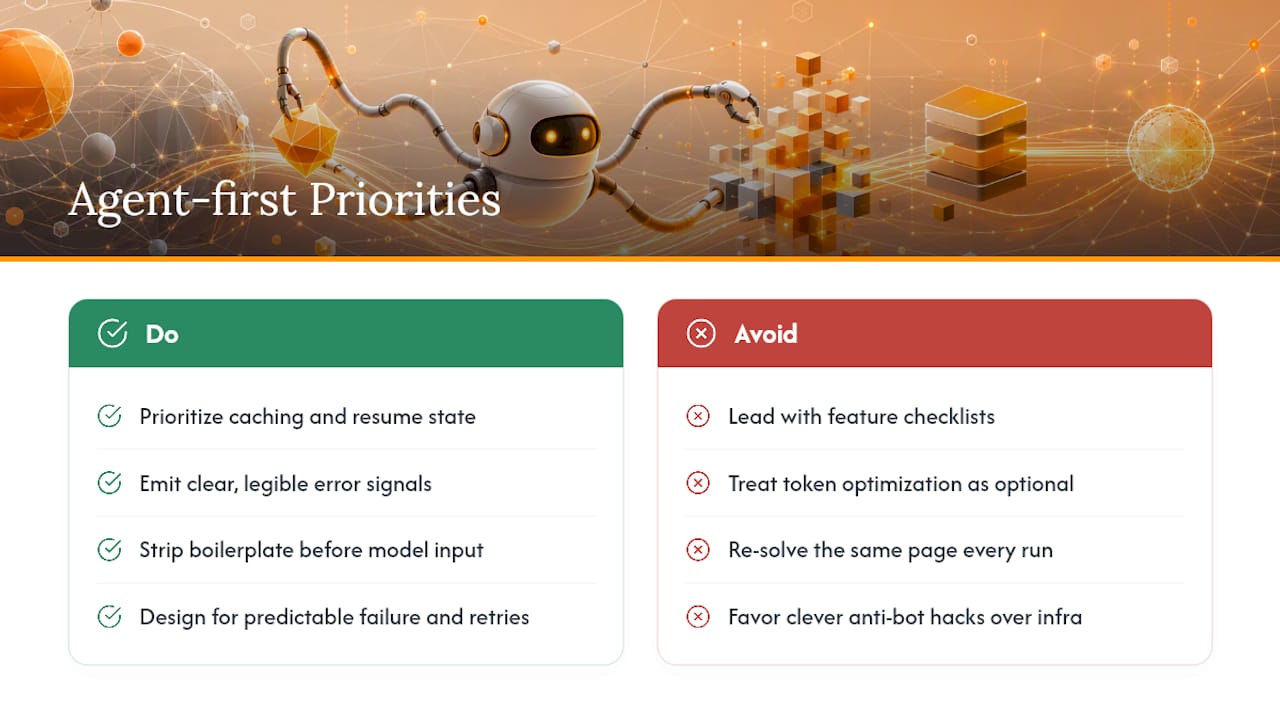
Most scraping guides still treat "can I extract the data" as the hard problem. It isn't, not anymore. Selector-based extraction and headless browsers have been commodity technology for years, and the tools covered here (Scrapy, AgentCrawl, Reader, Firecrawl) all solve fetching competently. The actual bottleneck in agent-first pipelines is what happens after the fetch: whether the output respects a token budget, whether failures are legible to downstream agent logic, and whether the whole thing survives running unattended for a month.
That's why I'd push back on any evaluation that leads with feature checklists and treats token optimization as a nice-to-have. Stripping boilerplate before content reaches a model's context window is often the single change that improves an agent pipeline's output quality more than swapping the underlying scraper entirely. The teams getting this right aren't the ones with the fanciest stealth techniques. They're the ones who designed for predictable failure from day one and built orchestration that remembers what already happened, instead of re-solving the same page every run.
Prioritize the boring infrastructure first: caching, resumable state, and clear error signals. The clever anti-bot workaround can come later.
Put Your Scraped Data to Work With agent-swarm
Building a scraper is only half the problem. The harder half is keeping a fleet of agents running that scraper, retrying failures, and routing the results without a human checking in on every batch, which is exactly the coordination gap agent-swarm closes.

Instead of wiring a scraping agent into a pile of cron jobs and Slack alerts by hand, agent-swarm gives you a lead agent that breaks a scraping objective into tasks, assigns them to isolated worker containers, and keeps contextual memory across every run so nothing gets re-fetched or re-processed for nothing. It's open source and self-hostable under MIT, or available as managed Cloud billed monthly by worker capacity, with access via the Cloud waitlist if you'd rather skip the infrastructure. Teams already running multi-agent coding workflows on the platform, documented in real client sessions, use the same orchestration pattern for recurring data pipelines. If you're weighing this against a single rented AI agent, the comparison against Devin walks through the tradeoff directly. Start with a one-worker proof of concept pointed at your current scraper and see how far persistent memory takes your next crawl.
Authoritative Docs and Examples to Start a PoC
- Scrapy: open-source framework and docs for selector-based, self-hosted scraping.
- Reader: production patterns for browser pooling and proxy rotation.
- Firecrawl: SDKs, MCP server, and interact endpoint docs.
Sources
FAQ
Is Web Scraping Illegal?
Scraping publicly available data is generally legal in most jurisdictions, but the legality depends heavily on the target's terms of service, whether the data is copyrighted or personal, and local regulations like the EU's GDPR. Always check the specific site's terms and consult a legal professional for high-stakes or large-scale projects.
Can ChatGPT Do Web Scraping?
ChatGPT itself doesn't fetch live web pages by default in a standard chat session, but it can generate scraping code (using Scrapy or similar libraries) and, through tool or plugin integrations, call external scraping APIs to retrieve and process page content.
Do Hackers Use Web Scraping?
Scraping techniques can be misused for credential stuffing reconnaissance, content theft, or bypassing rate limits, which is part of why legitimate anti-bot systems and CAPTCHA challenges exist. Responsible use means respecting robots.txt, rate limits, and a site's terms of service rather than treating stealth techniques as a license to ignore them.
Recommended
Related field notes
We Deleted --resume: A Bounded Preamble Beats Session Resume
Why Agent Swarm dropped claude --resume and codex.resumeThread for a 2,000-token context preamble that survives container restarts and harness re-routing.
Your Agents Write the Titles Your Trackers Read
An IMDEA audit of 9 AI chat services found trackers receiving titles, permalinks and screenshots, not just prompts. Agent swarms multiply those artifacts.
Best Open-Source AI Agent Platforms: Self-Host
Twelve open-source AI agent platforms you can self-host today, ranked by GitHub stars: license, install path, best use case and one real limitation each.