Release Notes Automation: A Practical Playbook for Teams
Discover how automating release notes can streamline your team's workflow, enhancing clarity and efficiency in managing multiple releases.

Automating release notes works best when you capture structured pull request summaries at merge time and synthesize polished, user-facing notes at tag time. This hybrid pattern suits any team shipping more than a few releases a month, especially across multiple repos. It avoids the two failure modes we see most often: raw changelog dumps nobody reads, and expensive LLM calls run against diffs too large to reason about accurately.
TL;DR:
- Automate release notes by capturing structured pull request summaries at merge and synthesizing polished notes at tag time, avoiding unreadable changelog dumps and large diff hallucinations.
- Trigger generation only after successful CI workflows to ensure trustworthiness, and implement idempotency checks to prevent duplicate entries during re-runs.
- Use deterministic parsing for fast, reliable commit-based notes and employ LLMs for explaining change significance, polishing language, and creating persona-specific variants.
- Filter out noise sources like bot commits and large diffs by labeling-driven inclusion and chunking large PRs to stay within context limits, with thorough logging for auditability.
- Connect automation into existing CI/CD platforms with event-based triggers, enforce security best practices, and track metrics like time-to-publish and hallucination rates to evaluate effectiveness.
Table of Contents
- What Release Notes Automation Actually Produces
- Trigger Timing Determines Whether Your Notes Are Trustworthy
- Choosing Between Deterministic Parsing and LLM Synthesis
- Filtering Noise Before It Reaches the LLM
- A Starter Recipe You Can Adapt Today
- Getting Notes to the People Who Need Them
- Wiring Automation Into Your Existing CI/CD Platform
- Formatting Notes So People Actually Read Them
- Managing Release Notes Across Branches and Versions
- Security and Compliance Considerations You Cannot Skip
- Measuring Whether Your Automation Is Actually Working
- Common Pitfalls and How to Fix Them
- Implementation Notes From Real Deployments
- Running This Pattern Without Building It From Scratch
- Sources
- FAQ
What Release Notes Automation Actually Produces
Before configuring anything, it helps to know what "automated" output actually looks like once it's working. Most platforms generate a fairly standard shape: a list of merged pull requests grouped by category, a contributor roll call, and a comparison link back to the previous tag. GitHub's automatically generated release notes follow exactly this format, pulling PR titles and mapping them into categories you define in .github/release.yml.
That raw output is not the same as a changelog, and treating them as interchangeable is where a lot of teams go wrong. A changelog is a running historical ledger; release notes are a communication artifact aimed at a specific audience deciding whether to upgrade. Automation typically covers:
- Merged-PR bullets, sorted into categories like "Features," "Fixes," and "Dependencies"
- Contributor attribution and a compare link between tags
- Custom section titles mapped from PR labels
- A changelog link for readers who want the full history
The gap between "list of merged PRs" and "explanation a customer can act on" is exactly what LLM synthesis is meant to close, which we'll get to shortly.
Trigger Timing Determines Whether Your Notes Are Trustworthy
Get the trigger wrong and everything downstream breaks, including notes generated for builds that never shipped. The single most important architectural decision in release notes automation is when generation fires, not what generates it.
- Trigger on
workflow_runafter CI succeeds, not onpull_request:closedalone. A closed PR isn't necessarily a merged, tested, or deployable one, and MergeDoc's approach specifically recommends waiting for CI success before summarizing anything. - Build in idempotency checks so a re-run (a flaky CI retry, a manual re-trigger) doesn't append the same PR twice to your notes or log file.
- Decide where synthesis happens: merge-time (fast, cheap, per-PR) versus tag-time (slower, holistic, user-facing). The strongest pattern uses both, one feeding the other.
- Plan a backfill path for tags cut before automation existed, so historical releases aren't left with empty or manually written notes.
Skipping step one is the most common mistake we see: teams wire generation to PR merges, then wonder why broken builds show up in changelogs their customers read.
Choosing Between Deterministic Parsing and LLM Synthesis
You don't have to pick a single method, and most mature setups run both. Deterministic tools like Conventional Commits parsing and git-cliff generate notes from commit prefixes (feat:, fix:, chore:) with zero API cost and zero hallucination risk. They're fast, auditable, and completely dependent on your team actually writing disciplined commit messages, which is the trade nobody mentions until six months in.
LLM synthesis earns its keep on three tasks deterministic parsing can't do: explaining why a change matters instead of just what changed, polishing terse commit prose into something a non-engineer can read, and generating persona-specific variants (a developer changelog versus a customer-facing announcement) from the same source material.
- Keep LLM prompts small and cheap by summarizing at the PR level first, not the full diff
- Set a deterministic fallback (plain commit-list output) for when API keys are missing or rate limits hit, a pattern tools like changelog-ai build in directly
- Use a strict mode flag that refuses to invent claims not traceable to an actual diff line
The hybrid pattern, per-PR summary now, LLM polish later, is what Louisa's implementation demonstrates well: cheap incremental work at merge time, one focused synthesis pass at release time.
Filtering Noise Before It Reaches the LLM
Signal-to-noise is the actual bottleneck in release notes automation, not model quality. A system that summarizes everything, including lockfile bumps, bot commits, and CI configuration churn, produces bloated notes nobody trusts, and that failure mode shows up repeatedly in practitioner writeups on the topic.
Filtering needs to happen at two levels: exclude lists (lockfiles, generated code, dependabot and other bot authors) and label-driven include lists (only PRs tagged feature, fix, or breaking make it into user-facing notes). Internal chores stay in the raw changelog but never reach the polished release notes a customer sees.
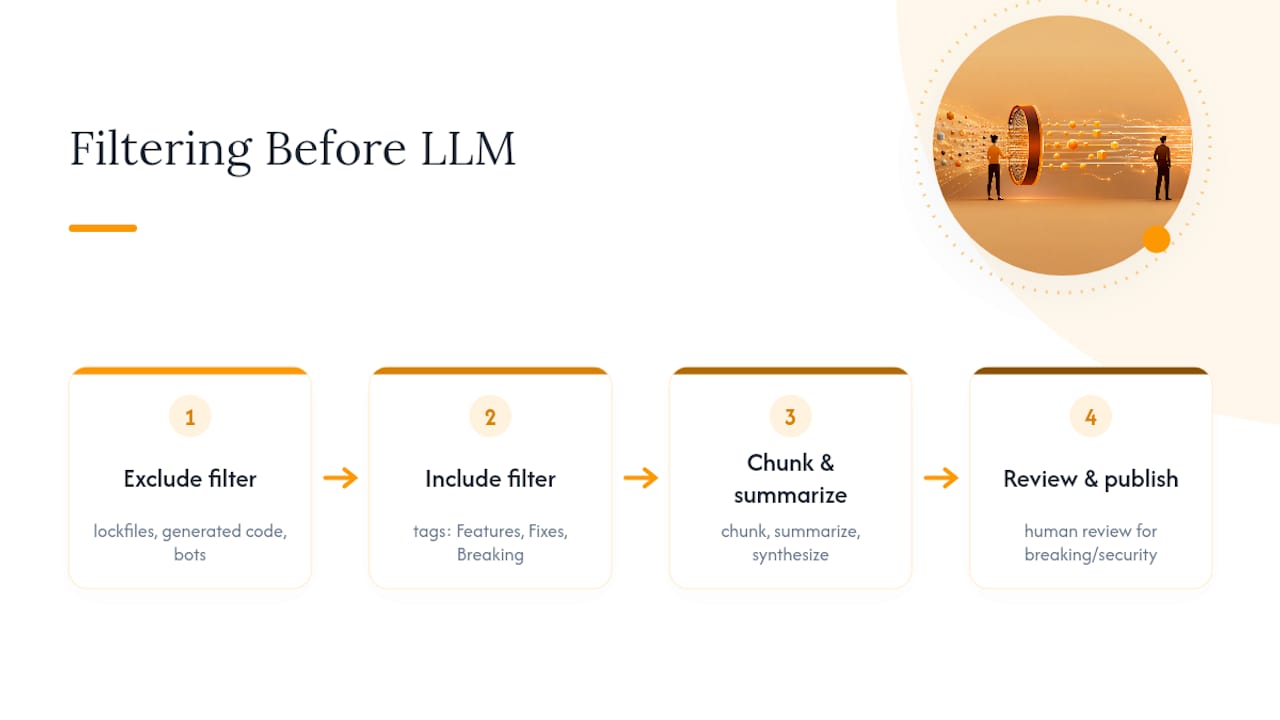
For large diffs, chunk the changed files into token-budgeted pieces, summarize each chunk independently, then run a final synthesis pass over the chunk summaries. This map-reduce approach keeps prompts inside context limits and reduces hallucination risk on sprawling PRs that touch dozens of files.
Pro Tip: Log every generation run (input diff hash, chunk count, model version, output) to a structured file. When a release note claims something the code doesn't do, you need to trace exactly which chunk produced that line, and eyeballing a Slack message six weeks later won't cut it.
Teams that skip observability here tend to find out about hallucinated claims from a confused customer, not from their own QA pass. Require human review on any note touching a breaking change or security fix category, full stop, regardless of how good your prompt has been so far.
A Starter Recipe You Can Adapt Today
You don't need a complex system to start. The pattern below covers the essentials: a workflow_run trigger, a category mapping, a persistent log, and a synthesis step that only fires on tag push.
| Component | Purpose | Example |
|---|---|---|
| Trigger | Fires only after CI passes | on: workflow_run targeting your CI workflow, types: [completed] |
| Category config | Maps PR labels to sections | .github/release.yml with feature, bug, dependencies labels |
| Exclude list | Drops noise from output | labels: ["dependencies"] with exclude set, plus bot author filters |
| Per-PR log | Stores summaries for reuse | Append JSON lines to logs/pr-summaries.jsonl on each merge |
| Synthesis step | Builds final notes | Reads the log on tag push, runs one LLM pass, posts output |
| Safety default | Prevents bad publishes | Dry-run mode outputs to a draft, never auto-publishes without a flag |
The .github/release.yml config is the piece most teams under-invest in. GitHub's docs lay out the exact keys, letting you exclude specific labels or authors entirely rather than filtering after the fact. Combine that with a dry-run default (write to a draft release, never publish automatically) and you've covered the two mistakes that cause the most rework: wrong categorization and premature publishing.
Getting Notes to the People Who Need Them
Generating good notes is only half the job. Distribution needs the same care as generation, because the wrong channel or timing turns a useful artifact into noise.
- Publish the primary version to your GitHub release page, since it's the canonical source most tools and customers already check
- Post a persona-specific summary to Slack or a support channel, engineers want the PR list, support teams want customer-facing language
- Include compare links and doc links inline so readers can go deeper without asking someone
- Batch minor releases into a scheduled monthly digest, but publish major or breaking releases immediately
- Build retry logic into notifications; a failed Slack webhook shouldn't silently swallow a release announcement
Publishing automation for content-heavy teams follows similar logic outside of software releases too. Teams automating WordPress publishing workflows run into the identical tension between scheduled batches and immediate publishes, and the scheduling patterns transfer directly.
Wiring Automation Into Your Existing CI/CD Platform
Release notes automation doesn't run in isolation. It has to hook into whatever CI/CD system already gates your deploys, and the three most common platforms handle the workflow_run pattern differently.

GitHub Actions has the most native support since GitHub's own generated-release-notes feature and the workflow_run trigger both live in the same ecosystem. A typical setup runs your test suite as one workflow, then a second workflow listens for that workflow's completion event, checks the conclusion was success, and only then kicks off summarization and publishing. This keeps generation cleanly separated from your test pipeline, so a slow test suite doesn't block your release note logic and a failing one never gets to publish notes.
GitLab CI doesn't have a direct workflow_run equivalent, but you can replicate the pattern using pipeline triggers combined with rules that check the upstream pipeline's status, or by calling the GitLab API to confirm a pipeline succeeded before invoking a downstream job. The key constraint is the same: never let note generation live in the same job stage as your tests, or a test failure and a documentation failure become impossible to distinguish in your logs.
Jenkins requires the most manual wiring since there's no built-in equivalent to either GitHub's or GitLab's event model. Most teams handle this with a post-build step that only triggers on a SUCCESS build result, calling out to whatever summarization script or LLM endpoint handles the actual generation. Because Jenkins pipelines vary so widely between organizations, the idempotency checks matter even more here. A retried Jenkins build without a merge-key deduplication step will happily generate duplicate entries.
Across all three, the underlying rule doesn't change: gate generation on a successful build event, never on a raw merge or push event alone.
Formatting Notes So People Actually Read Them
A technically accurate release note that nobody reads has failed at its one job. Readability comes down to a handful of formatting habits that automation makes easy to enforce consistently, unlike manual notes where every engineer writes differently.
Lead with the change that matters most to the reader, not the order PRs happened to merge in. Category headers (Features, Fixes, Breaking Changes, Dependencies) should always appear in the same order release over release, so returning readers build a scanning habit instead of re-reading the whole thing every time. Breaking changes deserve their own section at the top, formatted distinctly, bolded or called out visually, because burying a breaking change under twelve dependency bumps is how support tickets happen.
Keep individual bullets to one sentence wherever possible. A bullet that needs three sentences to explain a change usually means the PR itself did too many unrelated things, which is a signal worth feeding back to your team's PR review habits, not just your formatting rules. Link PR numbers and contributor handles inline rather than listing them separately; readers who want detail will click through, and readers who don't won't be interrupted.
Version headers should carry the release date and a compare link immediately, before any category content, so a reader scanning multiple releases can orient instantly. Avoid mixing internal jargon (ticket IDs, internal service names) into customer-facing notes; keep that detail in the raw changelog and translate it into plain language for the release notes themselves. This is exactly the kind of consistency problem LLM synthesis solves better than a rotating cast of engineers writing notes by hand ever will.
Managing Release Notes Across Branches and Versions
Multi-branch projects, and especially anything supporting long-term support (LTS) versions alongside a mainline branch, need a different mental model than a single-branch repo shipping continuously.
The core challenge is that a single fix often needs to appear in release notes for multiple versions at once: the mainline release where it was authored, and every supported LTS branch it gets backported into. Automation needs to track which tag a PR's changes actually shipped in, not just which branch the PR originally targeted, or you'll end up with notes that credit a fix to the wrong version.
A practical approach tags each per-PR summary with the target branch and release version at synthesis time, not at merge time, since a backport PR merges long after the original fix. Keep separate log files or separate namespaced entries per branch (logs/pr-summaries-main.jsonl, logs/pr-summaries-release-2.x.jsonl) so synthesis for one branch never accidentally pulls in unrelated branch history.
For projects running parallel major versions, cross-link release notes between them. A security fix backported to three supported versions should link each version's note to the others, so a reader on an older version understands the fix exists upstream too. Automation that treats every branch as an independent island misses this connective layer entirely, and it's usually the first thing that breaks when a project scales from one supported version to three.
Security and Compliance Considerations You Cannot Skip
Release notes automation touches your codebase's most sensitive metadata: what changed, who changed it, and often, implicitly, what vulnerabilities existed before a fix shipped. Treat the automation pipeline itself as part of your security surface, not just a documentation convenience.
Never let an LLM-based synthesis step have write access beyond what it needs. A summarization job that only needs to read diffs and post to a draft release doesn't need repository admin permissions, and scoping tokens down to the minimum required action limits blast radius if a workflow or API key is ever compromised.
Security fixes deserve careful language review before publishing, automated or not. A release note that says "fixed authentication bypass in the login flow" hands an attacker a roadmap for unpatched instances still running the old version. Many teams hold security-related PRs out of the automated pipeline entirely, routing them through mandatory human review with deliberately vague public language ("security hardening improvements") while the specific CVE details go through a separate, controlled disclosure process.
Compliance-driven industries (health tech, fintech, anything under SOC 2 or similar frameworks) often need an audit trail showing who approved a release note before it published, not just who wrote the underlying code. Build an approval gate into your synthesis step, even a lightweight one, a required Slack thumbs-up, a GitHub review requirement on the draft release, rather than relying on a fully automatic publish with no checkpoint. The audit trail matters as much as the note's content when a compliance reviewer asks how a public-facing document got approved.
Measuring Whether Your Automation Is Actually Working
Shipping the automation isn't the finish line. Without metrics, you won't know whether your release notes are helping or quietly degrading in quality as the codebase grows.
Track time-to-publish: the gap between a tag being cut and notes going live. A pipeline that used to publish in minutes and now takes hours usually means diff sizes have outgrown your chunking strategy, worth revisiting before it gets worse. Track edit rate, how often a human touches the generated draft before publishing. A rising edit rate over time is an early signal that categorization rules or prompt quality have drifted out of sync with how your team actually works now.
Watch for hallucination flags, cases where a generated note claimed a change that a reviewer couldn't trace back to an actual diff line. Even a low rate here matters more than most metrics, since a single fabricated claim in a public release note damages trust disproportionately to how often it happens. Logging each generation run's inputs and outputs, as covered earlier, is what makes this metric measurable at all instead of anecdotal.
On the distribution side, track engagement where you can: click-through on compare links, support ticket volume immediately following a release (a spike often means the notes didn't explain a breaking change clearly enough). None of these numbers need a dashboard to start; a shared spreadsheet updated after each release beats no measurement at all, and the pattern usually becomes obvious within two or three release cycles.
Common Pitfalls and How to Fix Them
Most release notes automation failures trace back to a handful of repeatable mistakes, and recognizing them early saves weeks of rework.
Generating notes on every merge instead of on tag. This produces a firehose of tiny updates nobody reads and often duplicates work when multiple PRs land before a release actually ships. Fix it by separating the per-PR summary step (cheap, runs on every merge) from the synthesis step (runs once, on tag push).
No deduplication on retriggered workflows. A flaky CI job that retries can cause the same PR to get logged twice, inflating your notes with repeated bullets. A merge-commit SHA or PR number used as a dedup key in your log file solves this in a few lines of code.
Treating the changelog and release notes as the same artifact. Raw commit history serves engineers debugging a regression. Release notes serve someone deciding whether to upgrade. Conflating them produces a document that satisfies neither audience well.
Letting the LLM see the entire diff at once. Beyond a few hundred changed lines, this both blows context budgets and increases the odds of hallucinated summaries. Chunk first, summarize each chunk, then synthesize, the map-reduce approach that keeps output grounded in what actually changed.
No fallback when the LLM API fails. A summarization pipeline with a hard dependency on one API endpoint will eventually go down at the worst possible moment, right before a release. A deterministic, commit-list fallback keeps releases shipping even when the fancier synthesis step can't run.
Implementation Notes From Real Deployments
Automation earned its keep fastest on the boring parts: contributor lists, compare links, category sorting. It never fully replaced a human on breaking-change language, and we stopped trying to force that. Running this across multiple repos surfaced a real tradeoff between per-repo summarization (fast, isolated) and a shared aggregation layer (better cross-project visibility, harder to keep consistent). The default we'd recommend now: log everything at merge time regardless of whether synthesis runs immediately. An audit trail you didn't need yet costs almost nothing to keep, and you will eventually want it for a security review or a "wait, when did we ship that?" question from a customer.
Running This Pattern Without Building It From Scratch
Most of what this guide describes, per-PR logging, workflow_run triggers, tag-time synthesis, multi-channel publishing, is exactly the kind of recurring engineering workflow agent-swarm was built to run without a human babysitting each step. Instead of stitching together a webhook handler, a log file, and a synthesis script yourself, a worker agent can own the whole loop: watch CI completion, append structured PR summaries, and run the tag-time LLM pass with the fallback and audit logging already built in.

You can see the pattern running end to end in agent-swarm's interactive examples, including how workers persist context across runs instead of starting from zero on every release. The self-hosted version is free and open-source under MIT if you want to run it on your own infrastructure with full control over data and prompts. Teams that want a hosted option can join the Cloud waitlist and have the release notes worker configured against a real repo the same day.
Sources
FAQ
What Is Release Notes Automation?
Release notes automation is the practice of generating structured, user-facing release documentation from merged pull requests, commits, or diffs, rather than writing it by hand for every release.
Should I Trigger Generation on Merge or on Tag?
Log per-PR summaries at merge time, but only run final synthesis and publishing on tag push, ideally gated by a workflow_run event confirming CI succeeded first.
How Do I Stop the LLM From Hallucinating Changes?
Chunk large diffs before summarization, cap each chunk to a token budget, and require a strict mode that only outputs claims traceable to an actual diff line.
Can I Automate Release Notes Without an LLM?
Yes. Deterministic tools parsing Conventional Commits, like git-cliff, generate accurate notes from commit prefixes with no API cost, though they can't explain why a change matters the way LLM synthesis can.
How Does agent-swarm Fit Into This Workflow?
agent-swarm can run the full hybrid pattern, per-PR logging, post-CI triggers, tag-time synthesis, and multi-channel publishing, as a persistent worker rather than a one-off script you maintain yourself.
Recommended
- Why We Ditched DAGs for State Machines in Agent Orchestration | agent-swarm.dev
- The Architecture Behind Task Delegation: Pools, Routing, and Dependencies | agent-swarm.dev
- Script Workflows: Durable One-off Runs for Agent Work | agent-swarm.dev
- We Hid 75 of Our Agent's 90 MCP Tools — And It Got Smarter | agent-swarm.dev
Related field notes
Shared-Context AI Agents: Patterns, Risks, and Setup
What shared-context AI agents are, how shared context differs from memory and private state, the risks, and how to run governed sharing.
We Deleted --resume: A Bounded Preamble Beats Session Resume
Why Agent Swarm dropped claude --resume and codex.resumeThread for a 2,000-token context preamble that survives container restarts and harness re-routing.
Your Agents Write the Titles Your Trackers Read
An IMDEA audit of 9 AI chat services found trackers receiving titles, permalinks and screenshots, not just prompts. Agent swarms multiply those artifacts.