Durable, Auditable GitHub AI Automation for Engineers
Safety first recipes and quick setups to add auditable, durable AI automation to GitHub repos. Start read only, use safe outputs, then scale.

GitHub automation AI means using agentic workflows, Copilot code review, and Actions-triggered LLM calls to handle PR reviews, triage, docs, and reporting inside your repos. The fastest safe first step: turn on Copilot code review or a single low-risk agentic workflow (a daily status report, not an auto-merge) with read-only defaults and human approval gating any write. Everything else builds from there.
TL;DR:
- Most teams begin with PR reviews, issue triage, or dependency summaries, using AI to flag issues or generate reports with minimal initial permissions.
- Deterministic GitHub Actions execute fixed steps, while agentic workflows use reasoning to provide variable judgments, layering AI reasoning over standard CI/CD tasks.
- Integration methods include authoring Markdown-based workflows, manual or automatic code reviews, direct LLM API calls for narrow tasks, and scoped GitHub Apps for deterministic actions.
- To prevent alert fatigue, start with read-only permissions and route all writes through reviewable safe-outputs, limiting notifications to genuine issues requiring human attention.
- Building durable automation involves using stateless worker containers with shared memory for context persistence, which enables retries and resumption without losing state.
Table of Contents
- What Can GitHub Automation AI Actually Do?
- How Do You Wire AI Into a Repo?
- How Do You Keep AI Agents From Creating Alert Fatigue?
- Quick Setup Recipes You Can Run Today
- How agent-swarm.dev Builds Durable GitHub Automations
- Build In-House or Adopt a Platform?
- Try agent-swarm for Auditable GitHub Automation
- Sources
- FAQ
What Can GitHub Automation AI Actually Do?
Most teams start with three jobs: pull request review, issue triage, and dependency hygiene. An agent reads a diff, flags a missing test or a suspicious dependency bump, and drops a comment. Another watches your issue tracker, tags duplicates, and drafts a summary for the next standup. A third generates a weekly repo health report: stale branches, flaky tests, PRs sitting untouched for two weeks.
The distinction that trips people up is deterministic Actions versus agentic workflows. A standard GitHub Action runs the same YAML steps every time, same input, same output, no reasoning involved. An agentic workflow reads context, weighs tradeoffs, and produces a judgment call, which means its output varies run to run even on identical input.
That's the core of what people mean by "Continuous AI": layering reasoning on top of your existing CI/CD, not replacing it.
- Automated PR review and inline suggestions
- Issue triage, labeling, and duplicate detection
- Documentation drafts and changelog generation
- Dependency update summaries and risk flags
- Recurring repo health and velocity reports
Deterministic Actions still own your build, test, and deploy steps. Agentic layers sit on top, handling the judgment work a YAML script can't.
How Do You Wire AI Into a Repo?
Four integration patterns cover almost every real setup, and each demands different plumbing.
- Agentic workflows. GitHub Agentic Workflows let you author automation as Markdown with YAML frontmatter, then compile it to a lock file that runs inside Actions. The frontmatter defines triggers, tool access, and safe-outputs, the explicit boundary that keeps an agent from writing to your repo without a defined, reviewable path.
- Copilot code review. You can request a review manually on a PR or configure it to run automatically on every push. Reviews typically complete in under 30 seconds and post as comment-type feedback, meaning they never satisfy a required approval on their own. Repository skills stored under
.github/skillslet you tune what the reviewer actually looks for. - Actions plus a raw LLM API call. Some teams wire a workflow step directly to an LLM endpoint. It works for narrow, low-stakes tasks like summarizing a changelog, but it's a poor choice for anything touching write permissions, since you lose the guardrails a dedicated agentic framework builds in by default.
- GitHub Apps and bots. When the task is fully deterministic (post a status badge, sync a project board, enforce a label schema), a GitHub App with scoped permissions is simpler and more auditable than dressing it up as an agent.
Open-source multi-engine AI reviewer setups show how quickly a team can wire an LLM into Actions for PR feedback, which is useful as a reference architecture even if you end up choosing agentic workflows instead.
Pro Tip: Start every new agentic workflow with write: false in its permissions block, watch its output for a week, then promote it to safe-outputs write access only once you trust its judgment on your specific repo.

How Do You Keep AI Agents From Creating Alert Fatigue?
Security here isn't optional hardening, it's the difference between an automation that survives six months and one that gets disabled after the third false alarm.
Read-only defaults come first. Every agent should start with permission to read issues, PRs, and code, and nothing more. Writes, meaning comments, labels, or commits, route through explicit safe-outputs, a defined, reviewable interface rather than direct repo access. Piping raw LLM calls into Actions with broad permissions is a known anti-pattern; teams that skip this step tend to discover it the hard way, usually via an agent that force-pushed something nobody asked for.
- Scope tokens to the minimum the task needs, never a repo-wide PAT for a summarization job
- Keep raw LLM API keys out of workflow files; use secrets and, where possible, an MCP layer instead of direct key exposure
- Apply tool allowlists and network isolation so an agent can't reach endpoints outside its job
- Log every agent run so you can audit what it read and what it tried to write
Noise control matters just as much as access control. The best-performing automation setups stay silent on green and only surface a comment when something genuinely needs a human's attention, rather than restating "looks good" on every PR. Design your comment policy around that principle from day one, not after your team starts muting the bot.
Quick Setup Recipes You Can Run Today
Each of these takes under fifteen minutes in a sandbox repo.
- Agentic workflow: daily repo status. Create
daily-repo-status.mdin your workflows directory with YAML frontmatter defining ascheduletrigger andsafe-outputs: comment. Rungh aw compileto generate the lock file, commit both files, and set any required secrets (an LLM API key) in repo settings. The first run should only post a comment, no write access beyond that. - Copilot code review: opt in and customize. Add
.github/copilot-instructions.mdto your repo root describing your review priorities (test coverage, security patterns, naming conventions). Enable automatic review in repo settings, or trigger one manually per PR with theghCLI. - Safe LLM Action: PAT plus dry-run. Wire a workflow step to your LLM provider using a fine-grained personal access token scoped to a single repo. Add a
dry_runinput defaulting totrue, and require a human to approve the workflow run before any PR gets created. A minimal step looks like:
- name: Summarize PR (dry run)
  if: ${{ inputs.dry_run == 'true' }}
  run: gh api /repos/${{ github.repository }}/pulls/${{ github.event.number }} | ./summarize.sh
How agent-swarm.dev Builds Durable GitHub Automations
We designed agent-swarm around a lead agent that breaks an objective into tasks and hands them to worker agents (running Claude Code, Codex, or OpenCode) inside isolated, stateless containers. No local database survives a container restart, which forces every worker to persist state through the shared memory layer instead of quietly accumulating drift.
That architecture is what makes durable script workflows possible: a one-off agent task can fail, retry, and resume without losing context, the same guarantee you'd want from any GitHub automation running unattended overnight.
- Native integrations across Slack, Linear, Turso, OpenAI, and GitHub
- Shared memory that compounds across runs instead of resetting each session
- Stateless worker containers enforced by design, not by policy
The same node-density questions that apply to GitHub bots apply here: more agents isn't automatically better, and scaling agent composition without instrumenting outcomes first is how teams end up back at square one.
Build In-House or Adopt a Platform?
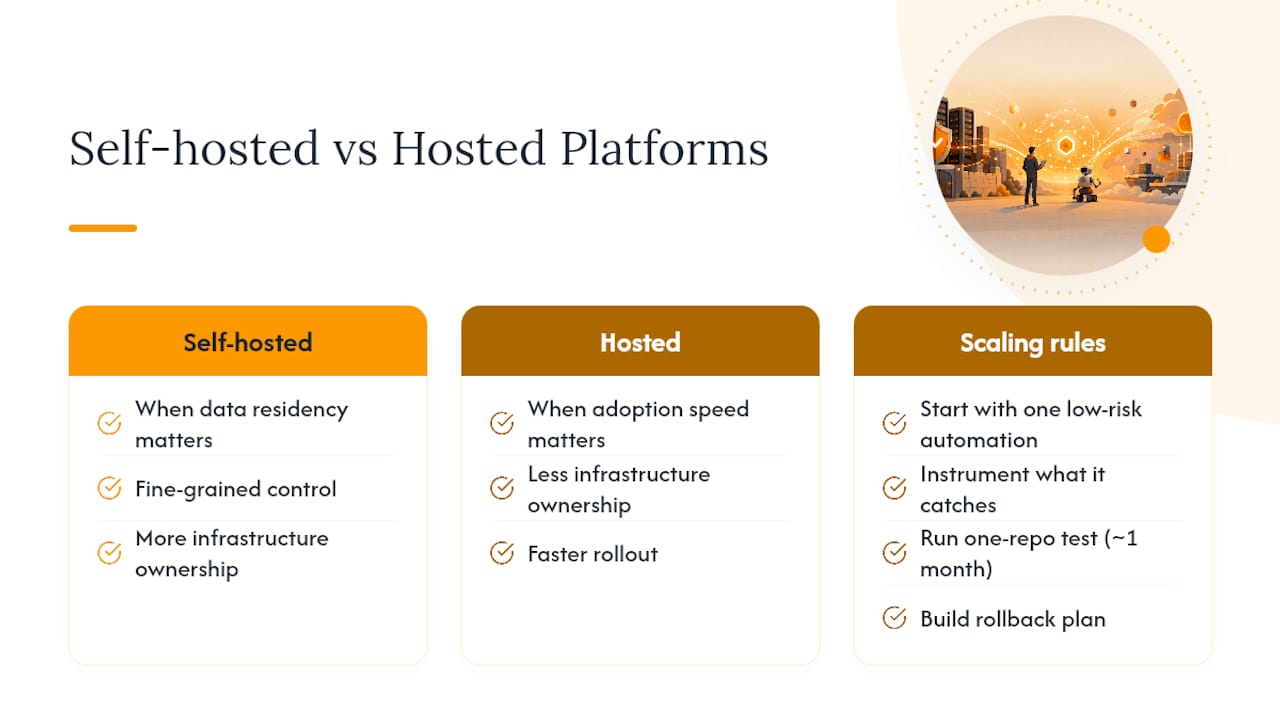
Start with one low-risk automation, instrument what it actually catches, then scale. I'd rather see a team run a Copilot review on one repo for a month than roll out five agentic workflows on day one.
Self-hosted setups win when data residency or fine-grained control matters; hosted options win when adoption speed matters more than owning the infrastructure. Either way, build your rollback plan, ownership model, and approval gates before you scale past the first automation, not after something breaks.
Try agent-swarm for Auditable GitHub Automation
agent-swarm is the route to durable, auditable GitHub automation for teams that have already outgrown a single Copilot review bot but don't want to hand-roll agentic workflow infrastructure from scratch. The core difference: worker agents run in stateless containers with shared memory that compounds across runs, so your repo automations don't reset their context every time a task kicks off, the way a lot of one-shot LLM Actions do.
If you're evaluating whether a single-agent assistant or a full standing team fits your GitHub workflows, the Hermes comparison breaks down that tradeoff directly. Teams weighing a heavier orchestration framework against agent-swarm's approach can check the CrewAI comparison for where each fits best. The fastest way to see it working against a real repo is the Examples page, where you can walk through an actual agent-swarm session end to end before deciding whether to self-host or discuss enterprise support.
Sources
- Automate repository tasks with GitHub Agentic Workflows - The GitHub Blog
- Using GitHub Copilot code review
- KonstZiv/ai-code-reviewer
FAQ
Does GitHub Have an AI?
Yes. GitHub ships Copilot code review, which can run automatically or on request, and GitHub Agentic Workflows, which let you author Markdown-based automations that compile into GitHub Actions.
Is GitHub an Automation Tool?
GitHub Actions is a deterministic automation platform for CI/CD, and layering agentic workflows or Copilot on top adds reasoning-based automation for tasks like triage and review that a fixed YAML script can't handle well.
Which AI Tool Is Best for Automating GitHub Workflows?
There's no single best tool: Copilot code review fits fast, low-setup PR feedback, GitHub Agentic Workflows fit custom reasoning tasks like triage or reporting, and a platform like agent-swarm fits teams that need durable, multi-agent orchestration across GitHub and other tools like Slack or Linear.
How Do I Avoid Alert Fatigue From AI Bots?
Keep automations silent when everything looks fine and design comment policies that only surface output when a human genuinely needs to act, rather than repeating a "no issues found" message on every PR.
What Permissions Should an AI Agent Have in a Repo?
Start with read-only access and route every write, comments included, through explicit safe-outputs rather than granting direct write permissions to the agent's token.
Recommended
Related field notes
How to Avoid Vendor Lock-In for Coding Agents: A Layer-by-Layer Exit Test
Coding-agent lock-in lives in the context layers, not the model. Audit eight layers, run the exit test, and keep memory and traces exportable.
Shared-Context AI Agents: Patterns, Risks, and Setup
What shared-context AI agents are, how shared context differs from memory and private state, the risks, and how to run governed sharing.
We Deleted --resume: A Bounded Preamble Beats Session Resume
Why Agent Swarm dropped claude --resume and codex.resumeThread for a 2,000-token context preamble that survives container restarts and harness re-routing.