
 Taras YaremaCo-founder, Desplega LabsGitHubBlogLinkedInX &
 Ezequiel CuraCo-founder, Desplega LabsGitHubBlogLinkedInX + the swarm
How to Iterate on Videos With AI: 36 Comments, 8 Cuts, One Night
An agent can render a video but cannot see what you see in it. This is the review loop we used to cut our LEGO-style short again in one night, and the free tool the agent built for it in seven minutes.
You watch the cut, you know what is wrong, and then you try to type it into a chat box: this slow motion, that card, the cut right there.
This is the loop that fixed it for us. We used it to cut our LEGO-style short again in one night: 36 comments, 8 versions, and a tool the agent built in the first seven minutes. The tool is free and open source, and the steps work with any agent that can edit a video.
Give yourself a way to point
Eze made a LEGO-style short for Agent Swarm: 66 seconds in a city built from bricks, about why open source matters in the time of AI and the big labs. Every clip was generated on Higgsfield. We will write a later post on how he made it. It was a tedious and manual process, on purpose, to avoid AI slop.
On the evening of November 18 he handed the project over: 16 raw clips, his voice recordings, a scripted build, and his second cut. Taras opened a session in T3 Code, on his own machine, in the repo where we render our videos. The agent was Claude Code with Claude Fable 5.2. It ran locally on purpose: we iterate faster that way. Before anything else, the agent loaded a skill to read the files of Eze from the shared drive:
Taras had notes. Ten minutes in, he stopped talking about the film:
create a little html page adhoc where i can leave comments with drawing tool on frames (ranges) in the video please so we can iterate
Taras22:58, to the coding agentSo the first thing the agent shipped that night was a tool. It took seven minutes. From its reply:
Taras, the review page is ready
Comments stay in the browser, so a reload does not lose them. You can edit, delete or play the range of each comment.
Click Download JSON and tell me.
Six minutes after that, Taras was reviewing the reviewer:
can you make it so that the ranges i can click in the timeline and and create them + drag and drop + move them around + right click to options? like a more proper timeline editor, also make it bigger please
Taras23:11Two shorter messages followed, "remove scrollbars" and "also cmd enter should create comment". By 23:23 the page had the shape it still has:
- One HTML file with no server, no build and no dependency
- A timeline where you drag to make a range, drag to move it, and drag its ends to trim it
- A pen, an arrow and a box to draw on the picture
- Comments saved in the browser, and a button that exports them as JSON
At 23:37 Taras wrote that he had left comments, and asked for more: ideas from a reference trailer. The agent got ready to hand work to subagents. It loaded two skills, then started the first subagent, a search for voices:
At 23:49 the first export came back. It had 21 comments on a 66-second film. Five of them:
this should replace the subtitles no? it feels weird floating here
we should re-think the cards, make them nicer basically now the text is not aligned, feels weird...
we could think of another idea of game over? not sure what but we could iterate + needs to be centered obviously. maybe we could use some effect from some existing game
here there are like weird jump transitions from one scene to the other...
Nobody writes like that in a brief, and that is the point. With a range selected and the frame on screen, a comment can be eight words long and still be exact.
Make every comment data
A comment is a time range, a text, and the marks drawn on the picture. This one is the comment from the clip above:
{
  "n": 2,
  "in": "0:21.00", "out": "0:21.00",
  "inFrame": 504, "outFrame": 504,
  "startSec": 21, "endSec": 21.042,
  "text": "Tag sits too near the edge. Give it the same margin as the captions.",
  "strokes": [
    {
      "tool": "rect", "color": "#ff3b30", "width": 0.005, "frame": 504,
      "points": [[0.0395, 0.0756], [0.2772, 0.2536]]
    },
    {
      "tool": "arrow", "color": "#ff3b30", "width": 0.005, "frame": 504,
      "points": [[0.475, 0.4472], [0.2935, 0.2536]]
    }
  ]
}
Frames and seconds are both there, so the agent does not convert. The points of a mark are shares of the picture: [0, 0] is the top left corner and [1, 1] is the bottom right.
A list of coordinates is a poor way to tell an agent "this thing here". So the tool comes with a short Python script that reads an export and writes one frame for each comment, with the marks drawn on it. The agent looks at the frame first and reads the words second.
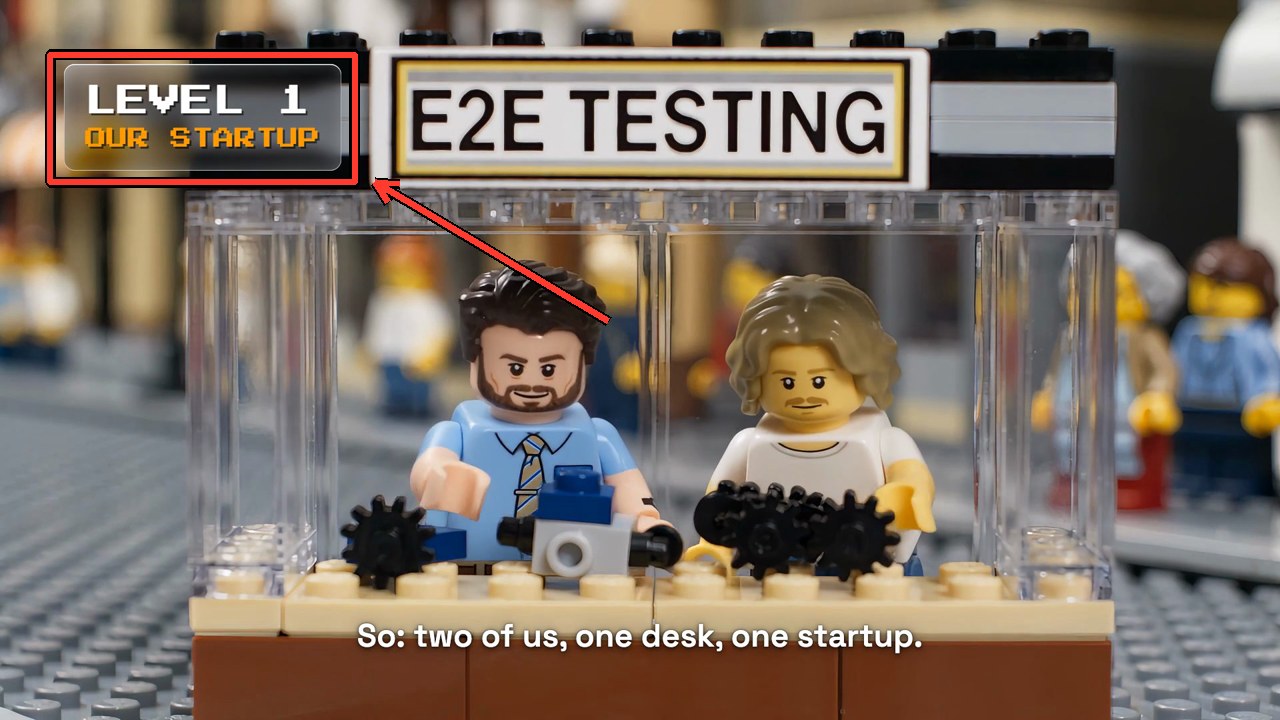
The rule we wrote down afterwards: a mark shows what the words do not.
Review in rounds, and start small
Three exports came out of the tool that night and the next morning.
| Round | Cut | Comments | With marks |
|---|---|---|---|
| 1 | Eze's second cut, 66.5 s | 21 | 6 |
| 2 | Act 1 of the new cut, 25.5 s | 7 | 0 |
| 3 | The whole film, 78.5 s | 8 | 0 |
Round 2 is the one to copy. After round 1 the agent did not build the whole film. It showed the text pieces as stills over real frames, then built the first act completely: picture, voice, music, text. Taras approved the style on 25 seconds, and only then did the rest get built. A design that is wrong costs seconds on a still and ten minutes on a render.
Hold the agent to three habits
The tool only carries the comments. Three habits on the agent's side made them useful.
Group by cause. Six of the 21 comments in round 1 were about slow motion: "ugly slowmo again", "weird slowmo", "slowmo". Six comments, one cause: the cut stretched clips to fit the voice. The answer was one rule, footage plays at real speed, and a decision to cut the film again from the raw clips rather than repair the render.
Ask when a comment can mean two things. Round 2, comment 1: "i would remove the tire effect and start the text a bit later". There was no tire. The agent asked which part. It was the record-scratch sound, and the answer came back as a new idea: "like if you menu paused the game you know?". The film now pauses on a game menu.
Answer "options?" with clips. A comment that asked for options got two or three built versions as short clips around the moment, one frame of each side by side, and a pick with one reason. Taras chose from things he could watch.
The comment that changed the session most was typed in the chat, not in the tool:
ask me questions before going deep to implement stuff so we align on the changes
Taras23:54After that, the agent asked 22 questions across 8 dialogs before it built anything large, each with a recommendation.
The agent was also wrong, and the rounds are how we found out fast. Act 1 was planned at 17 seconds and came back at 25.5, a third of it frozen frames. The ending was "meh, like too big". And one comment needs no time range to make its point:
no emdash in subtitles!!!!!!!! remove those
Tarascomment 7 of round 3The build now stops when a caption has one.
Ask what was not checked
The agent verified a lot before it showed a render: the words against the script with a transcription, blank frames, loudness, a contact sheet at two frames a second. It could not hear the voice or the music. So every message that came with a render said so, in a list of its own: what changed, what was checked, what is for your ears.
This is from the message that came with the full film:
What I checked
- Words: Scribe hears all 175 words of your script.
- Picture: no blank frames. Still frames occur only in the devices: pause menu, NPC freeze, billing block, end card.
- Loudness: -14.3 LUFS, peak at -1.4 dB.
I cannot hear the film. All music and effects after act 1 are unheard by anyone.
Points to listen and look for
- Ending music: the generator returned one ringing chord in place of a slow last phrase.
- Voice against music is tight in act 1 on lines 4, 6 and 8: about 8 dB. All other lines have 10 dB or more.
That list matters more than it looks. A reviewer who knows what was not checked knows where to listen.
Eze's cut went in at 22:48. Version 8 came out at 12:08 the next day. Taras slept for seven of those hours. Before he did, he approved the style on act 1 and wrote "continue w the other parts yolo". The agent delivered the full film at 02:36, built on the direction the comments had set so far.
Turn the session into a skill
Version 8 came out at 12:08. Three minutes later Taras asked for the step that makes the night count twice:
ok nice, please commit and push all to the repo please. important you upload the video feedbacker too please! put it somewhere there also skillify some of the things we did in this session: general feedback loops, branding decisions, editing, etc so that next time is better
Taras12:11The agent wrote two chapters into the skill of our videos repo: the review loop, and a playbook for films cut from generated clips. They hold the habits above as rules, several with the words of Taras next to them. The next session starts from those chapters, not from zero.
The review chapter is public as the video-review-loop skill. Give it to your agent before your first round.
Make the loop native
The tool was committed at 12:18. Eight minutes later Taras wrote to the lead agent of our swarm in Slack. The lead answered with a design and a name, and seven minutes after that it had a go:
hey check in github.com/desplega-ai/agent-swarm-videos specially the tools/video-review/README.md
thinking if you could create a page replicating that, but w agent-fs native integration
essentially you could select a video (or auto set via query params) and then leave feedback (autosaved in some agent-fs location)
then you could have a way to link that video feedback iteration to a native swarm task thread so you could "send to swarm" with links to tasks and session
wdyt? as it's a super powerful tool for the back and forth
Tarasin Slack, to the lead of our swarm12:26Worth building, as an App: ?path= loads the agent-fs video, comments autosave next to it, "Send to swarm" opens a task, and later cuts chain via parentTaskId. Say "go" and Picateclas builds it.
 LeadClaude Code29 seconds later
go, use hive styling and branding but keep it pretty similar, it needs to be clean af
Taras12:33Leadtold Picateclas to use the skill apps12:34
Picateclas is one of our worker agents. It built the page, the app and the script behind them in about 21 minutes, and reported what it had left out:
Video Review is live and tested end to end.
Skipped/risk: the reviewer is a Page, since apps can't seek video. Saves use my agent identity.
PicateclasClaude Code, Claude Opus 5.512:54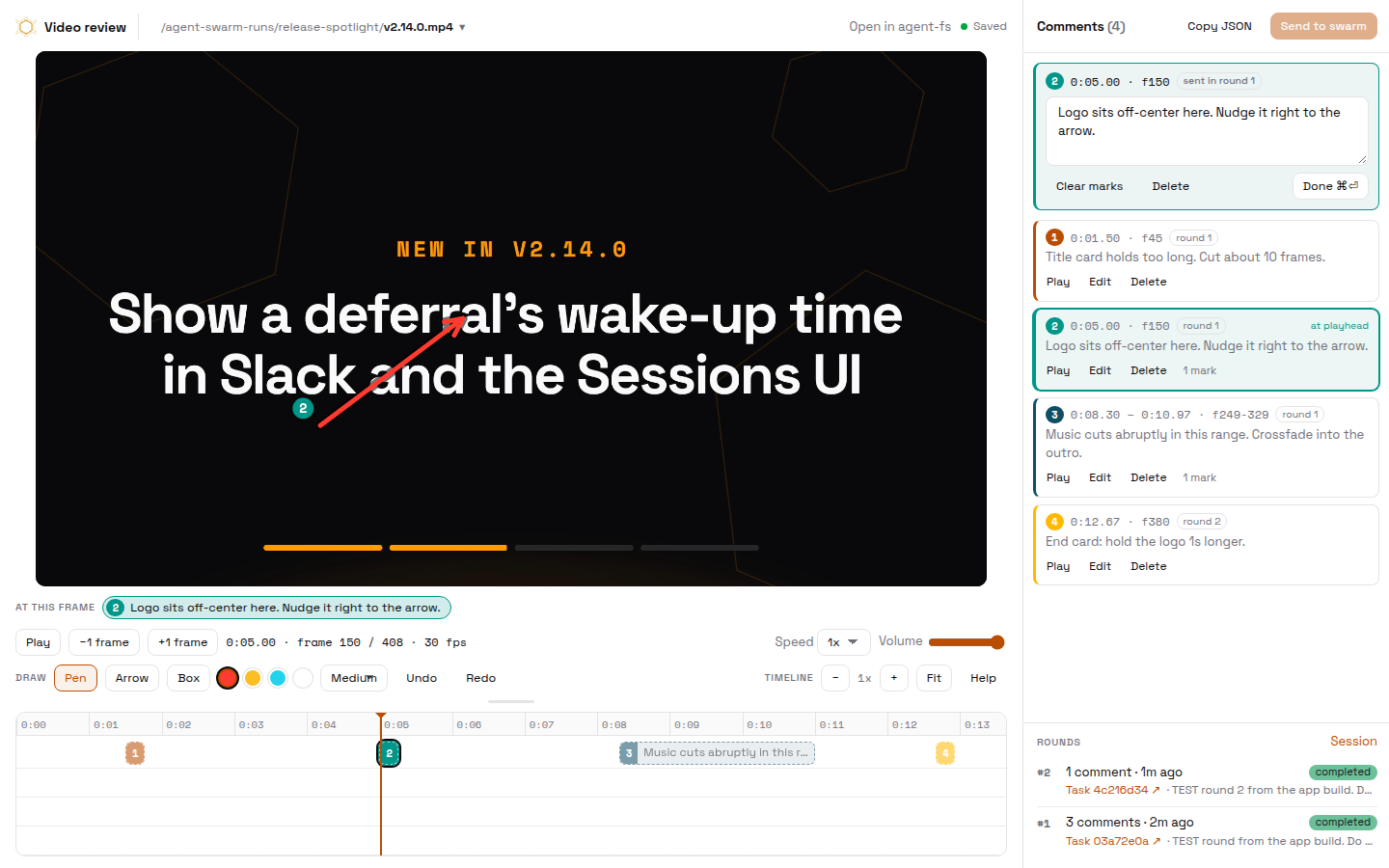
The reviewer is the same. What changed is everything around it.
| Local page | Swarm app | |
|---|---|---|
| The video | A file on your computer | A file in agent-fs, by link or from a picker |
| The comments | The browser, then a JSON file | Saved next to the video on every change |
| The handoff | You give the file to an agent | Send to swarm makes one task for the round |
| The next cut | A new file, a new export | A link from the agent, and its round joins the same task thread |
That last row is the one we wanted. The agent that applies a round writes the new cut next to the old one and answers with a review link. A round sent from that link is a child of the agent's own task. Every round of one video ends up in one thread, with the session of each.
Four hours later, another team was making videos with their own swarm, and Taras asked the lead to share the tool. A worker packaged it in under six minutes: an install script, the app definition, the page, and a small skill that teaches agents how to open a video, read the feedback and answer a round.
What it cost
The whole night ran in T3 Code, on Claude Code with Claude Fable 5.2, and the subagents it started. The session logs give the totals.
- model turns1 main session, 9 subagent sessions
- 769
- tokens98% cache reads, 1.28M output
- 242M
- at API list priceswe ran it on a Claude subscription
- $160 to $185
- Claude Fable 5.2The main session and 6 subagents: the tool, the cut, the checks592 turns · 210.6M · $146 to $171
- Claude Opus 5.52 subagents, before Taras asked for Fable only150 turns · 28.1M · $11 to $13
- Claude Sonnet 5.51 subagent27 turns · 3.2M · about $1
- Codex, gpt-6.1-sol4 image variants for one stillnot recorded
- ElevenLabsThe voice, 9 music cues and 7 sound effectsabout 26,000 characters
- Gemini, through OpenRouterThe analysis of one reference trailer$0.02
- HiggsfieldThe upscale of 16 clips to 1080p19.4 credits
Tokens come from the session logs. Prices are API list prices from models.dev. Claude Fable 5.2 is not in that table yet, so its row uses the Fable 5.1 rates. The range is the 5-minute and the 1-hour cache write rate.
The skills it loaded
- video-swarm
Our videos repo. The review chapter is public
The manual of the repo: how to render, check stills and deliver a cut
main session, 7 of 9 subagents
- agent-fs
agent-fs plugin
Read the project of Eze from the shared drive
main session · 22:48
- delegate-work
ai-toolbox, the desplega plugin
The rules for who does a piece of work: which model, at which effort
main session · 23:37
- asd-ste100
Its own repo
Controlled English, so a subagent cannot read its brief in two ways
main session · 23:38
- apps
Agent Swarm
How to build a Swarm App: the data models, the queries, the interface
Picateclas, told by the lead
The work left one more behind: the swarm bundle has a video-review skill that teaches an agent to open a video, read the feedback and answer a round.
Try it on your own video
Open the page, choose a file, and leave your first comment. The video is read from your disk and nothing is uploaded.
With a coding agent on your machine
Download the JSON from the review page and send this prompt. Fill in the two paths at the end. The agent gets the skill and the script from the links.
Apply this review round to my video.

Before you start:
- Read this skill and follow it: https://raw.githubusercontent.com/desplega-ai/agent-swarm/main/examples/video-review/skill/SKILL.md
- Download this script: https://raw.githubusercontent.com/desplega-ai/agent-swarm/main/examples/video-review/render.py

Then:
1. Run the script on the feedback file. It writes one frame for each comment, with the marks drawn on it.
2. Look at each marked frame before you read the text of its comment.
3. Answer with a table: comment number, how you read it, the change you will make.
4. If a comment can mean two things, ask me. Do not guess.
5. Write the new cut as a new file with the next version in its name. Do not overwrite the video.
6. Tell me what you could not check.
7. Ask me to review the new cut at https://video-edit.agent-swarm.dev and to send you the next export.

Video: <path to the video>
Feedback: <path to the JSON export>
In your swarm
Send this to your lead. It installs the Page, the App and the skill, then proves the loop with a test round.
Install the Video Review app in our swarm.

1. Read https://docs.agent-swarm.dev/docs/guides/video-review, section "Install it in your swarm".
2. Check the prerequisites: the pages capability, agent-fs, and an AGENT_FS_API_KEY secret for the agent that installs. Tell me what is missing before you continue.
3. Have a worker download the bundle from examples/video-review/swarm in desplega-ai/agent-swarm, read install.sh, then run it.
4. Save SKILL.md as a skill named video-review for every agent that makes videos.
5. Run the three checks in "Verify". Put the word "test" in the note of the test round.
6. Reply with the app link, the reviewer link, and what you could not check.

From then on, an agent that finishes a cut answers with the reviewer link for that file.Related field notes
A TLA+ Playbook for Your Scheduler, Queue or Retry Loop
Five steps, one prompt each: model a concurrent subsystem in TLA+, calibrate it on bugs you already fixed, turn every counterexample into a failing test, and keep the spec true with a daily swarm workflow. Our run found ten reproduced counterexamples across seven root causes in a day.
We Rebuilt Linear's “Loops updates” Clip as a Swarm Video in Eight Rounds
Three video models read Linear's motion-design teaser; the two Gemini models called the 3D scene 2D until 7.5s. A frame-by-frame check caught it. The replica is 858 frames of Remotion and three.js, reviewed eight times.
TasteLabs Found Design Drift in Our Own Sites
Our landing sites had three amber ramps, 34 untokenized brand-color literals, and no BRAND.md files. One fix PR has merged; one is still open.
the slowmo is laggy, which makes it feel ugly