6 Approval Workflow Features That Prove agent-swarm.dev Fits Engineers
Why agent-swarm.dev suits engineering teams: AI enabled orchestration, persistent workflow memory, and self-hosted or cloud deployment. Learn how to...

For engineering and cross-functional teams that need auditable, AI-enabled approval routing without renting a black box, agent-swarm.dev is the strongest pick. It combines open-source orchestration, persistent workflow memory, and flexible self-hosted or cloud deployment, which matters more than a slick UI once your approval chains touch multiple systems. The rest of this guide walks through how to validate that choice against your own requirements.
TL;DR:
- Self-hosted deployment keeps approval records within your infrastructure, making it suitable for strict data residency requirements.
- The platform offers native integrations with Slack, GitHub, ERP, CRM, and SSO, but these must be verified during testing to prevent connectivity issues.
- Validating audit logs involves checking timestamp formats, field-level change history, and the ability to export data that satisfies compliance standards.
- Real-volume testing reveals whether approval routing remains responsive at higher volumes and whether escalation processes are automated effectively.
- Pilot success depends on measuring actual reductions in cycle time, manual escalations, and confirming the audit export functions correctly under full-scale operation.
Table of Contents
- What Is the Best Approval Workflow Software for Engineering Teams?
- What Should You Evaluate Before Choosing Approval Software?
- Which Features Actually Matter in an Approval Workflow?
- How Do Integrations and Compliance Affect Your Choice?
- What Does Implementation Actually Cost and Take?
- How Does agent-swarm.dev Handle Approval Automation in Practice?
- What Actually Goes Wrong When Teams Roll Out Approval Software
- Getting Started With agent-swarm.dev
- Sources
- FAQ
What Is the Best Approval Workflow Software for Engineering Teams?
This solution automates the parts of approval workflows most tools treat as an afterthought: routing decisions, data extraction from incoming requests, and the handoff between AI-driven triage and human sign-off. A lead agent breaks an objective into tasks, assigns them to specialized workers running AI models, and each worker operates in an isolated container. That containment matters for approvals because it keeps one agent's mistake from cascading into a live production system.
The teams that get the most out of this are engineering groups drowning in recurring approval loops (code review gating, deployment sign-offs, vendor access requests), cross-functional automation owners stitching together finance and legal checkpoints, and operations teams handling high-volume, repetitive approvals where a human reviewer is a bottleneck rather than a decision-maker.
Deployment choice depends on two variables: data residency requirements and available IT bandwidth. Teams with strict residency rules or existing container infrastructure should pilot the self-hosted deployment first, since it keeps every approval record inside infrastructure you already control. Teams that want to see value inside a week should start with the cloud-hosted option instead and migrate later if compliance demands it.
What Should You Evaluate Before Choosing Approval Software?
Picking the best software for approvals is less about a features checklist and more about stress-testing the parts that fail quietly. Vendor demos are built to hide friction, so the questions you ask during a trial should target the friction directly.
Run your evaluation across seven axes:
- Deployment model: does the vendor support self-hosted, cloud, or both, and what changes if you switch later?
- Integration depth: does it connect natively to the systems your approvals actually touch, or does it require middleware?
- Auditability: can you export a complete, timestamped audit trail without a support ticket?
- Conditional routing: does it handle threshold-based and multi-branch logic, or only simple sequential chains?
- Scale behavior: what happens to routing latency once approval volume triples?
- Governance controls: who can change a workflow definition, and is that change itself logged?
- Total cost of ownership: does pricing scale predictably, or does it jump at integration or seat thresholds?
During any trial, insist on concrete tests rather than a guided tour. Export the audit logs yourself and check the timestamp format. Build one real routing example with a conditional branch, not the vendor's canned demo. Pull an API payload and read it, since a workflow tool's real flexibility lives in whether its API is actually open or just documented. Validate single sign-on and role-based access control with a real user, not an admin account. Then test delegation: assign an approval to a backup approver and confirm the escalation actually fires when the clock runs out.
Watch for three red flags that show up constantly in vendor evaluations. An incomplete audit export, one missing a field-level change history, is a compliance liability disguised as a minor gap. A closed API that only accepts webhooks but won't let you pull data back out is a lock-in mechanism, not a limitation. And opaque pricing that requires a sales call to quote a five-seat pilot usually means the real cost shows up after you are already dependent on the platform.
Pro Tip: Ask a vendor to show you what happens when an approval sits unresolved for 48 hours. If the answer involves a person manually checking a dashboard instead of an automatic escalation, you have found the workflow's actual bottleneck.
Which Features Actually Matter in an Approval Workflow?
Feature lists across approval management software look nearly identical on a landing page. The differences that matter show up only once you run real volume through the system.
- Forms and data capture. Templates and field validation are table stakes now. What separates a modern tool is AI extraction that pulls structured data out of an invoice, contract, or ticket, and a confidence indicator that flags low-certainty extractions for human review instead of silently guessing.
- Routing logic. Sequential approval chains are easy to build and easy to outgrow. Look for parallel approval support, conditional branches based on request value or category, threshold routing that escalates automatically past a dollar amount, and clear escalation rules when an approver goes silent.
- Audit and version history. altaFlow documents conditional routing and escalation rules alongside certified ERP and CRM integrations, which is the combination auditors actually check during a review: not just that a decision was logged, but that the logic behind the routing itself is traceable. Field-level diffs and exportable formats (CSV, PDF, or a structured log auditors can ingest) separate a real audit trail from a status field that says "approved."
- Notifications, delegation, and SLA enforcement. A workflow with no service-level enforcement degrades into an email inbox nobody checks. The tools worth using enforce a deadline and reroute automatically when it passes.
- E-signature versus workflow finalization. Some approvals need a legal signature; most just need a logged decision. ApproveThis advertises one-click external approvals with immutable timestamps, which works for vendor and client sign-off scenarios where you cannot require a login.
- AI-assisted triage. AI features that summarize a request, flag anomalies against historical approvals, or suggest the correct routing path cut manual review time meaningfully. This is where AI-enabled orchestration tools pull ahead of static, rules-only systems.
How Do Integrations and Compliance Affect Your Choice?
The integrations question is where approval workflow optimization projects quietly stall. A platform that looks perfect in a demo can fail procurement once someone asks whether it connects to the ERP system finance actually uses.
Before signing anything, verify the vendor supports the specific connectors your workflows depend on:
- Slack and Microsoft Teams for approval notifications and in-context decisions
- GitHub or your source control platform for code-review and deployment gating
- ERP or CRM systems for finance and sales approval chains
- Cloud storage providers for document-heavy approvals
- SSO providers (Okta, Azure AD, or similar) for identity and access control
Cloud and self-hosted deployments trade off differently depending on what you value. Cloud gets you rolling in days and removes maintenance burden, but you inherit the vendor's data residency defaults. Self-hosted gives you full control over where approval data lives and how long it is retained, at the cost of needing internal infrastructure and someone to maintain it.
On security, ask directly for SOC 2 or ISO certification status, encryption at rest and in transit, and role-based access control granularity. Aproove emphasizes atomic-level change capture and exportable audit logs as the standard for regulated content workflows, which is a reasonable bar to hold any vendor to if your industry faces audits.
To validate audit readiness before you commit, request a sample export during the trial, check that timestamps include time zone data (not just a date), and confirm the platform can tie every logged action to a verified identity rather than a generic system account.
What Does Implementation Actually Cost and Take?
Pricing for approval workflow software generally falls into three shapes: per-request pricing that scales with volume, per-seat pricing tied to the number of approvers or workers, and tiered plans that bundle a feature set at each level with enterprise support layered on top for larger deployments.
The advertised price rarely tells the whole story. Integration engineering (connecting the platform to your actual ERP, CRM, or internal tools) often costs more than the software license itself. Custom routing logic beyond basic conditionals can require professional services. And some vendors charge separately for SLA guarantees that should arguably be included by default.
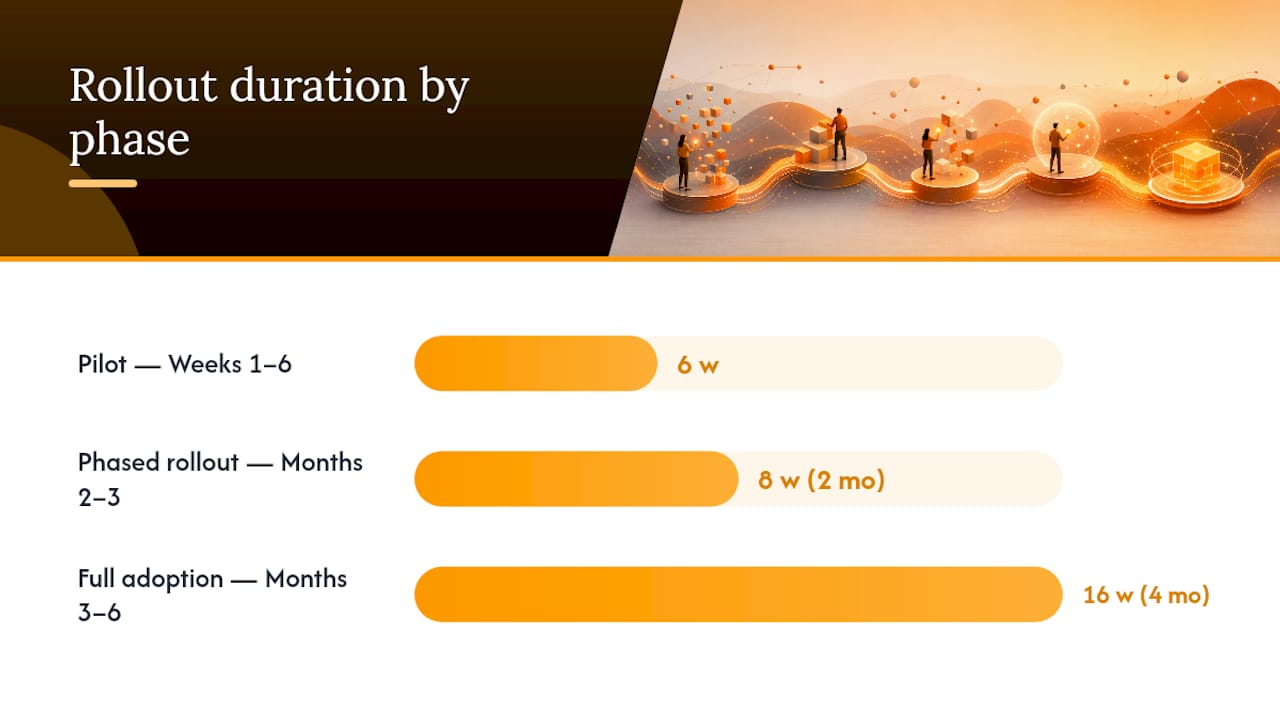
A realistic rollout looks like this:
- Weeks 1–6: Pilot on a single, well-understood workflow (one department, one approval type). Measure cycle time before and after.
- Months 2–3: Phased rollout to two or three additional teams, incorporating feedback from the pilot's failure points.
- Months 3–6: Full organizational adoption, with governance rules finalized and audit export validated at scale.
Before calling a pilot successful, confirm three things: cycle time actually dropped compared to your baseline, manual escalations (someone chasing an approver by phone or email) declined measurably, and the audit export you pulled during evaluation still works correctly under real production volume. If any of those three fail, the pilot succeeded on paper but not in practice.
How Does agent-swarm.dev Handle Approval Automation in Practice?
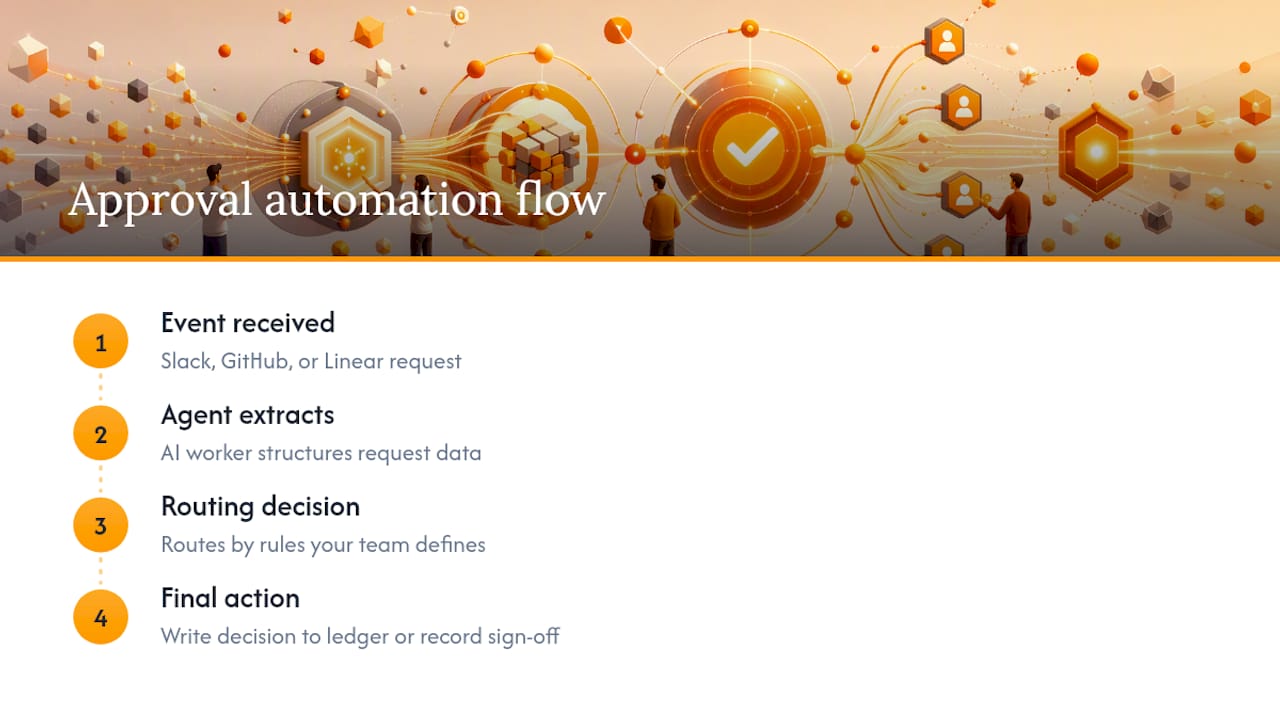
agent-swarm.dev's approach to approval automation runs on event-driven integration rather than a fixed form builder. A request lands in Slack, GitHub, or Linear, a worker agent extracts and structures the relevant data, and the routing decision fires based on rules your team defines, not a rigid template the vendor controls. One documented pattern shows Slack-based AI approvals built with MCP for engineering teams, where the approval request, context, and decision all live inside the same channel the team already works in.
Two workflow shapes come up constantly. The first is invoice approval: AI extracts line items and vendor details, routes the request to the appropriate approver based on amount, and writes the final decision back to the ledger automatically. The second is code-review gating, where a deployment request captures compliance sign-off as a structured, timestamped record instead of a comment buried in a pull request thread.
The project's open-source repository and its published engineering guide to agentic workflow design give teams a way to inspect the orchestration logic before committing, which matters more than a vendor's marketing claims. Choosing self-hosted versus cloud comes down to the same variable raised earlier: residency and internal maintenance capacity. Teams without a strong platform engineering function typically start on cloud and revisit later.
What Actually Goes Wrong When Teams Roll Out Approval Software
Three mistakes show up repeatedly. Teams over-engineer the first workflow instead of piloting one simple approval chain. They skip testing the audit export until an actual auditor asks for it, by which point gaps are expensive to fix. And they roll out a new system without training the approvers themselves, so adoption stalls at the exact people whose sign-off the workflow depends on.
The fix is boring but works: pilot narrow, export the audit log on day one of the trial (not week six), and walk every approver through a live example before go-live. If a vendor demo can't survive you asking to see a failed escalation, that gap will show up in production.
— Ez.-
Getting Started With agent-swarm.dev
If the evaluation criteria above have you leaning toward a real pilot, agent-swarm.dev gives you three ways in: Self-hosted, Cloud, and Enterprise. Self-hosted deployment has no published price and runs on infrastructure you control from day one. Cloud runs €30 to €100 per month and gets a pilot workflow live in days rather than weeks. Enterprise adds tailored support and integration work, priced on request.
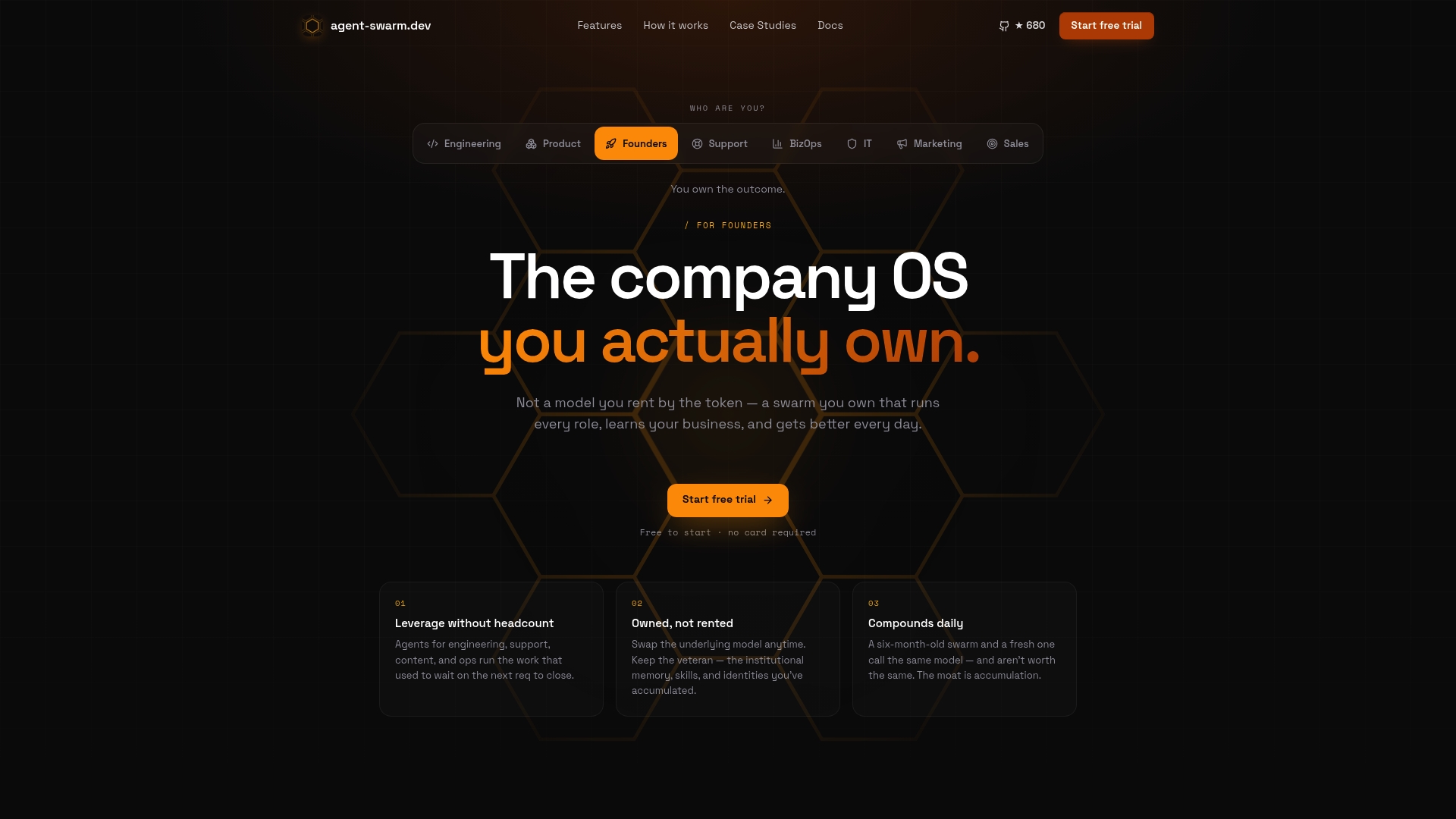
Unlike a closed platform where switching AI models means starting your automation logic over, the software maintains persistent memory and skill sharing across model changes, so an approval workflow retains context instead of resetting. If you're comparing rented AI agents against an owned, self-hosted swarm, the breakdown of Agent-swarm walks through that trade-off directly.
Start with a narrow pilot: one approval workflow, one team, integrated with the Slack or GitHub channel that team already lives in. Pull the audit export on day one. Check the pricing page to pick the deployment that matches your data residency needs, and go from there.
Sources
- Home | ApproveThis
- Approval Workflow Automation Software | No-Code Routing & Escalation | altaFlow
- Approval Workflow Software for Audit-Ready Content
FAQ
What Makes Software the Best Approval Workflow Choice?
The best approval workflow software depends on your integration needs, auditability requirements, and deployment constraints rather than any single universal winner. For engineering teams needing AI-enabled routing and persistent workflow memory, agent-swarm.dev fits because it combines open-source flexibility with self-hosted or cloud deployment.
How Long Does It Take to Implement Approval Software?
A focused pilot on one workflow typically takes four to six weeks, followed by a phased rollout of two to three months to additional teams. Full organizational adoption usually lands within three to six months once governance rules and audit exports are validated.
Does Approval Software Need SOC 2 or ISO Certification?
Certification matters most for regulated industries handling sensitive financial, health, or legal approvals, where auditors expect documented compliance. Ask vendors directly for current certification status rather than assuming a feature page's claims apply to your specific use case.
How Much Does agent-swarm.dev Cost?
agent-swarm.dev offers self-hosted deployment with no published price, a cloud plan priced at €30 to €100 per month, and enterprise packages priced on request. Self-hosted is free to run on your own infrastructure under the open-source license.
What Is the Difference Between Sequential and Conditional Routing?
Sequential routing sends a request through a fixed chain of approvers in order, while conditional routing branches based on rules like request value or category. Most teams outgrow sequential-only systems once approval volume or complexity increases, which is why conditional and threshold routing show up as a core evaluation criterion.
Recommended
Related field notes
Estado compartido entre agentes: la memoria que decide si tu enjambre funciona
Descubre cómo el estado compartido entre agentes ofrece memoria persistente para coordinar enjambres, cuándo usarlo y evitar la contaminación de contexto.
Pass the 3 AM Test: Airflow Alternatives for Engineering Teams
Compare Airflow alternatives by 3 AM operational ergonomics. Run a two-week POC, test backfill and debugging, and trial agent-swarm for persistent,...
Seguridad en IA autohospedada: guía técnica para equipos
Guía técnica para proteger la IA autohospedada: aplica confianza cero al proxy, verifica pesos y SBOM, aísla ejecución y registra eventos en SIEM.