Self Hosted AI Agents With Auditable, Persistent Memory for Engineers
A practical shortlist for engineering teams needing self-hosted AI agents that keep owned, auditable memory. Includes deployment runbooks, security...
If your team needs owned, auditable multi-agent orchestration with memory that compounds over time, agent-swarm is the strongest pick, with Nabu for privacy-maximal single-database setups, n8n for teams that think in visual workflows, and Ollama plus LocalAI for anyone who needs to keep every token on-premise. The right answer depends on whether you're optimizing for autonomy, integration surface, or air-gapped privacy. The rest of this guide breaks down deployment, security, and cost so you can validate the fit before you commit infrastructure.
TL;DR:
- Self-hosted agent platforms vary depending on the mission, with agent-swarm excelling at multi-agent orchestration and Nabu prioritizing privacy with a centralized Postgres setup.
- Evaluation should include testing data residency, model swapping flexibility, and memory exportability through proof-of-concept and migration drills before commitment.
- Hardware needs range from 4 CPU cores and 8GB RAM for simple API calls to GPUs with 16GB VRAM and NVMe storage for local model hosting, scaled by deployment model.
- Security best practices demand private networks, scoped permissions, encrypted data at rest, and immutable run logs to ensure compliance and prevent breaches.
- Costs encompass infrastructure expenses, engineering effort, and operational maintenance, with self-hosting potentially saving money at high volume but increasing complexity for updates and backups.
Table of Contents
- What Are the Best Self-Hosted AI Agent Platforms?
- How Should Engineering Teams Evaluate a Self-Hosted Agent Platform?
- What Hardware and Deployment Setup Do You Need?
- How Do You Secure a Self-Hosted Agent Stack?
- How Do Integrations and Memory Affect Production Behavior?
- What Does Self-Hosting Actually Cost Over Time?
- What agent-swarm Gets Right About Owning Your Agent Stack
- Where the Conventional Wisdom on Self-Hosting Gets It Backwards
- Get a Self-Hosted Agent Running This Afternoon
- Where to Verify These Claims
- Sources
- FAQ
What Are the Best Self-Hosted AI Agent Platforms?
The self-hosted agent space splits cleanly into five missions: personal assistants, autonomous task executors, multi-agent orchestrators, workflow/RAG builders, and fully local runtimes. Most evaluation mistakes come from comparing a personal assistant framework against an orchestration platform as if they solve the same problem, when they don't. Open-source roundups consistently show that OSS agents specialize by interface, autonomy level, and operational complexity, so the sane first move is picking your mission, then narrowing the field.
agent-swarm leads this list because it's built around a lead agent that decomposes objectives and hands tasks to specialized workers (running Claude Code, Codex, OpenCode, or similar) inside isolated Docker containers. Memory and context compound across runs instead of resetting per session, which matters once your automations span more than a single script. It integrates with Slack, GitHub, Linear, Turso, and OpenAI, ships as MIT-licensed self-hosted software, and supports Kubernetes for production scale.
Twelve other platforms show up across engineering shortlists for good reason:
- OpenClaw installs in minutes via a single command and specializes in messaging-first personal assistants across many chat platforms, per its own self-hosted deployment guide.
- AutoGPT runs iterative, goal-driven autonomous loops, useful for prototyping one-off task execution rather than standing infrastructure.
- CrewAI gives developers primitives for building bespoke multi-agent collaboration systems from scratch.
- n8n is a visual, low-code automation tool with over 400 connectors, extendable with agent nodes for teams that prefer flowcharts to code.
- Dify bundles a visual builder with a built-in RAG pipeline and vector store for teams shipping AI apps fast.
- LangChain / LangGraph are the developer libraries most teams reach for when they want composable, model-agnostic orchestration logic they control line by line.
- LangFlow offers drag-and-drop prototyping for RAG and agent flows that exports to production code.
- LocalAI provides a fully offline, OpenAI-compatible inference API for privacy-maximal deployments with zero external calls.
- LocalAGI adds autonomous agent behavior on top of local runtimes, so you get agency without ever leaving your own hardware.
- Ollama handles local model lifecycle management, the tool most teams use to actually run and swap models on-premise.
- Nabu centralizes memory in Postgres with pgvector and runs on a deliberately tiny, dependency-free stack, which cuts backup and migration complexity to almost nothing.
- nanobot is an ultra-lightweight, self-hosted personal agent framework supporting multi-agent workflows, persistent memory, and a wide range of channel integrations, all in a minimal footprint.
Beyond these, a handful of other names round out the ecosystem worth knowing: Flowise (visual LLM app builder in the LangFlow mold), Jan.ai (desktop-first local model runner), text-generation-webui (a long-running community favorite for local model tinkering), OpenHands and OpenCode (autonomous coding agents), Cline, Aider, Goose, and Kilo Code (developer-focused coding assistants that live in your terminal or IDE), Tabby (self-hosted code completion), and AutoGen (Microsoft's multi-agent conversation framework). Frameworks like agency-agents extend the multi-agent pattern for teams building their own orchestration layer from primitives rather than adopting a full platform.
| Platform | Best for | Deployment model | Memory/persistence | Integration surfaces | Model options | License |
|---|---|---|---|---|---|---|
| agent-swarm | Multi-agent orchestration with owned memory | Docker, Kubernetes, self-hosted or cloud | Long-term, compounding across workers | Slack, GitHub, Linear, Turso, OpenAI, webhooks | Local LLMs or API (model-agnostic) | MIT (open-source core) |
| OpenClaw | Messaging-first personal assistant | Docker, single-process | Per-session with skill memory | Broad messaging platforms | API-based | Open-source |
| AutoGPT | Autonomous one-off task execution | Single-process | Session-scoped | Limited native integrations | API-based | MIT |
| CrewAI | Custom multi-agent collaboration builds | Single-process, containerizable | Developer-defined | Developer-built connectors | API or local | MIT |
| n8n | Visual, integrations-first workflows | Docker, Kubernetes | Workflow-state persistence | 400+ connectors, webhooks, CI | API or local via nodes | Fair-code (commercial-adjacent) |
| Dify | RAG-backed AI apps | Docker, Kubernetes | Built-in vector store (RAG) | API, webhooks | API or local | MIT |
| LangChain / LangGraph | Custom agent logic and orchestration | Library, deploy anywhere | Developer-implemented (vector DBs) | Any, via code | Model-agnostic | MIT |
| LangFlow | RAG and agent prototyping | Docker, single-process | RAG via connected vector stores | Exports to code, API | API or local | MIT |
| LocalAI | Fully offline inference | Docker, single-process | None native (pair with a DB) | OpenAI-compatible API | Local only | MIT |
| LocalAGI | Autonomous local-only agents | Docker, single-process | Local persistence layer | Limited, local-first | Local only | Open-source |
| Ollama | Local model hosting and lifecycle | Single-process, Docker | N/A (model runtime only) | API for other tools to call | Local only | MIT |
| Nabu | Minimal privacy-first production stack | Single-process, Docker | Postgres + pgvector, centralized | Cron jobs, custom hooks | API or local | Open-source |
Pro Tip: If you're not sure which mission fits your team, run the same small task through two candidates from different categories, say n8n and CrewAI, before comparing feature lists. The friction you hit tells you more than any spec sheet.
Quick selection scenarios: if you need a personal assistant, start with OpenClaw or nanobot. If you're building multi-agent orchestration for recurring engineering work, agent-swarm or CrewAI fit best. For RAG and app building, Dify or LangFlow win. For fully local, privacy-first stacks, pair Ollama or LocalAI with LocalAGI or Nabu.
How Should Engineering Teams Evaluate a Self-Hosted Agent Platform?
Feature checklists miss the questions that actually predict a painful migration six months in. Prioritize these criteria instead, in roughly this order: data residency (does anything leave your network by default?), model freedom (can you swap the underlying LLM without rewriting agent logic?), auditability (can you replay a run and see exactly what happened?), upgrade path (is the project active, and does breaking changes have a migration guide?), and persistence (does memory survive a container restart, and can you export it?).
Run two spikes before committing:
- A one-day proof: install the platform, wire it to one real data source, and run a single end-to-end task with a human approval gate before any write action.
- A two-week pilot: add a second integration, measure failure rate and latency under real load, and test what happens when a worker crashes mid-task.
- A migration drill: try exporting your memory store, then re-importing it into a fresh instance. If this fails or isn't documented, that's your answer on lock-in risk.
- A cost trace: run the pilot with both a local model and an API model, and compare actual dollars per completed task, not per token.
Watch for these red flags during evaluation: no documented way to export memory or run history, hidden calls to a vendor's cloud even in "self-hosted mode," a monolithic codebase with no test coverage on the agent loop, and a license that restricts commercial self-hosting despite being marketed as open source.
Pro Tip: Test the approval workflow before you test anything else. Practitioners building nanobot recommend wiring a single agent to a single integration and running a controlled loop that requires human sign-off before any destructive action. It exercises the full stack while keeping the blast radius small if something breaks.
What Hardware and Deployment Setup Do You Need?
Hardware requirements scale sharply depending on whether you're calling an API or hosting models locally. For development and light testing with API-based models, 4 CPU cores, 8GB RAM, and 20GB SSD storage will run most frameworks (LangChain, CrewAI, n8n) comfortably. Team production workloads with moderate concurrency need 8+ cores, 16 to 32GB RAM, and fast SSD storage for vector databases and logs.
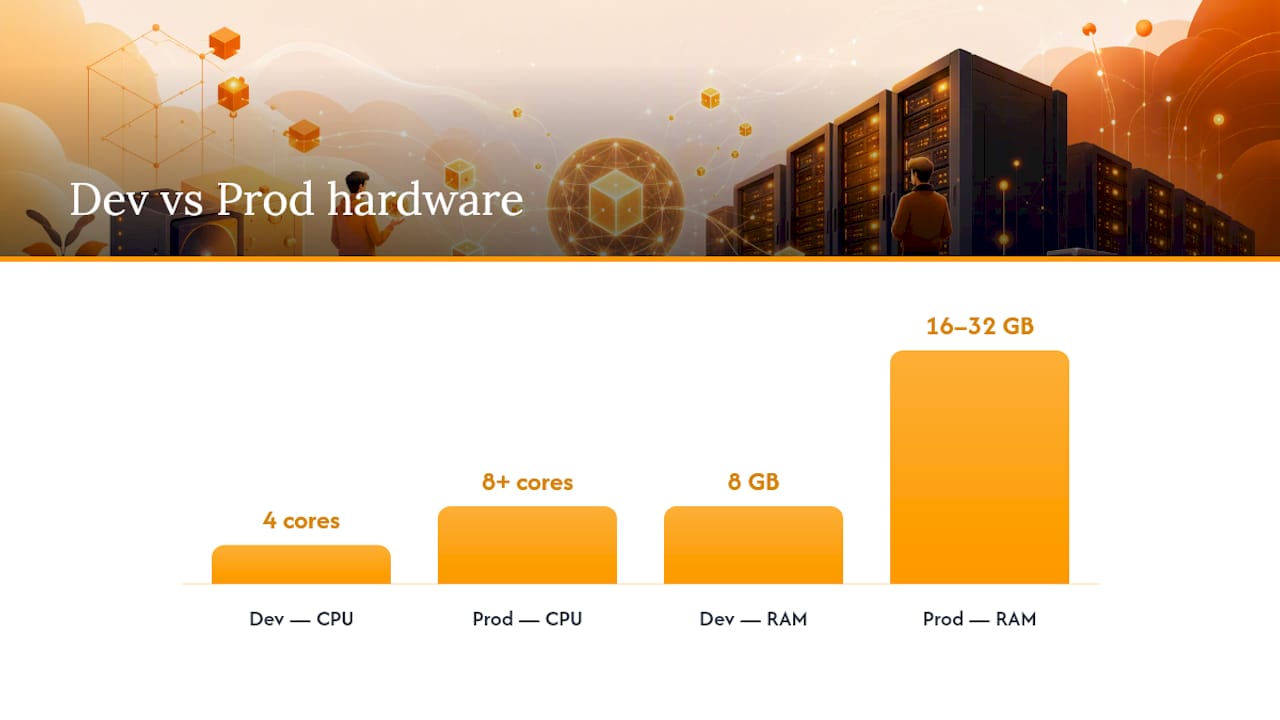
Fully local model hosting changes the equation entirely. Running a mid-size model through Ollama or LocalAI for real workloads generally calls for a GPU with at least 16GB of VRAM, 32GB+ system RAM, and NVMe storage, according to the hardware guidance in OpenClaw's deployment documentation.
Deployment patterns follow team size:
- Docker Compose for a quick proof of concept or single-team deployment, the fastest path to a working demo.
- A single VPS running Docker for small teams that don't need horizontal scaling yet.
- Kubernetes for production, once you need autoscaling, multi-tenant isolation, or reduced cold-start latency across many concurrent agent workers.
The local-versus-API decision is the one that actually drives your architecture. As OpenClaw's own analysis puts it, model hosting choice affects hardware, latency, privacy, and cost more than the agent framework sitting on top of it. Local models cut per-token cost and keep data on-premise but add GPU expense and maintenance. API models skip the hardware bill but introduce a recurring cost and an external data path you have to account for.
A practical pilot checklist: install the platform, run a smoke test against a dummy task, integrate one external system (Slack or GitHub is a good first target), enable authentication before anything touches production data, and require a manual approval step for the first real run. Full instructions for packaging agent runtimes securely are worth reading before you containerize anything for real use.
How Do You Secure a Self-Hosted Agent Stack?
Self-hosting means you own every layer of the security stack, not just the parts a SaaS vendor doesn't manage for you. Start with secrets: API keys and credentials need scoped permissions per integration and a rotation schedule, not a single admin token shared across every worker container.
Network exposure deserves the same rigor you'd apply to any production service:
- Run agent workers inside a private VPC or network segment, never exposed directly to the public internet.
- Terminate TLS at the edge and enforce it internally between the lead agent and worker containers.
- Apply least-privilege scoping to each agent's capabilities. A worker that only needs to read a GitHub repo shouldn't hold write access to your Slack workspace.
Data lifecycle policy matters more once you have persistent memory and vector stores accumulating institutional knowledge. Encrypt vector data at rest, define a retention window, and build a redact-on-demand path for anything containing sensitive information a worker touched incidentally.
Finally, treat run logs as an audit trail, not debug output. Immutable run histories let you replay exactly what an agent did and why. Pair that with human approval gates on destructive actions and a test harness that exercises the failure paths, not just the happy path.
Pro Tip: Build your approval gate before your first integration goes live, not after an agent does something you didn't expect. Retrofitting approvals into a running system is far harder than designing them in from day one.
How Do Integrations and Memory Affect Production Behavior?
Every integration you add carries an operational cost beyond the setup time. Messaging bots (Slack, Discord) need webhook reliability and rate-limit handling. CI/Git integrations need scoped repo access and careful handling of secrets in pipeline logs. Webhooks in general are the most common failure point in production agent systems, since a dropped or duplicated event can trigger repeated actions if you don't build in idempotency.
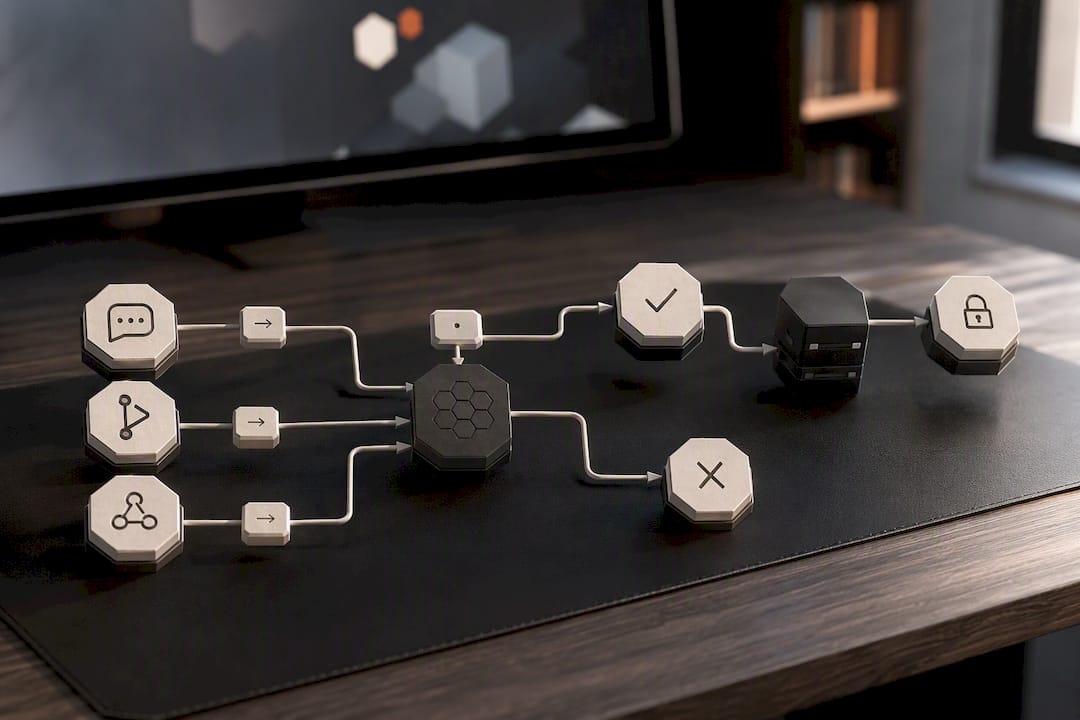
Memory architecture shapes both privacy exposure and cost. Session-only memory is cheapest and safest but forces agents to relearn context every run. Long-term vector stores (RAG) let agents build on prior work, which is exactly what makes agent-swarm's compounding memory model useful for recurring workflows, but it also means sensitive data persists longer and needs the retention policy discussed above.
Observability is where most self-hosted deployments fall short. Track at minimum:
- Run latency, broken out by model call time versus tool execution time.
- Failure rate per integration, not just an aggregate number.
- Cost per run, especially when mixing local and API models in the same pipeline.
- Alerts for runaway agents, meaning loops that exceed a step count or budget threshold without completing.
On integration breadth, nanobot's architecture is worth studying as a reference point. It supports multi-agent workflows and persistent memory alongside a wide range of channel integrations while staying lightweight, proof that integration count and operational simplicity aren't mutually exclusive if the core design is disciplined.
What Does Self-Hosting Actually Cost Over Time?
Four cost drivers dominate a self-hosted agent budget: inference (GPU amortization versus API token spend), vector database storage, general hosting (VPS or Kubernetes nodes), and the engineering time to maintain the stack. Self-hosting cuts the recurring per-seat SaaS fee that platforms charge, but it shifts that cost into infrastructure and ops labor, which is easy to underestimate during a pilot.
Where self-hosting saves money: high-volume, predictable workloads where a local model amortizes GPU cost below API pricing over time, and situations where data residency requirements would otherwise force an expensive compliance add-on from a hosted vendor.
Where it increases burden: patching, model version upgrades, and backup testing all become your team's responsibility. A realistic maintenance cadence looks like monthly security patching, quarterly model evaluation (swapping in newer local or API models as they outperform your current one), and backup restore tests at least every quarter, not just backup creation.
A minimal incident runbook for a misbehaving agent:
- Kill the specific worker container, not the whole orchestration layer.
- Pull the immutable run log for the last N actions before the incident.
- Check for a runaway loop or budget breach in the observability dashboard.
- Roll back to the last known-good memory snapshot if state got corrupted.
- Patch the failure mode and re-run the one-day proof spike before returning to production traffic.
What agent-swarm Gets Right About Owning Your Agent Stack
We built agent-swarm around a simple bet: the value in an agent system isn't the model, it's the memory and workflow logic your team accumulates around it. The lead agent decomposes objectives, hands tasks to specialized workers running Claude Code, Codex, or OpenCode inside isolated containers, and shares context back so the next task starts smarter than the last one. That's a deliberate answer to the biggest gap in most of the frameworks above: they orchestrate well, but they forget everything the moment the container recycles.
Integrations with Slack, GitHub, Linear, and OpenAI aren't bolted on. They're the surface most teams actually automate against day one. If you want to see what that looks like on a real workflow rather than a demo, the session examples walk through actual runs end to end. It's the multi-agent orchestration and compounding memory that keep coming up as the differentiator, not the model underneath.
Where the Conventional Wisdom on Self-Hosting Gets It Backwards
Most guides frame self-hosting as a tradeoff between control and convenience, as if the only cost of a hosted platform is losing some flexibility. That's not the real cost. The real cost is that hosted platforms reset your institutional knowledge every time you switch vendors, change plans, or hit a feature wall and migrate. You don't just lose convenience. You lose the accumulated context your agents built up, and you start over.
The teams that get self-hosting wrong aren't the ones who pick the "wrong" framework off this list. They're the ones who treat memory as an afterthought, bolt on persistence after the fact, and then wonder why their agents behave like they have amnesia. Persistent, portable memory should be a day-one architectural decision, not a feature you add in month six when the lack of it starts costing real time.
There's also a quieter mistake worth naming: teams over-index on autonomy level (how independently an agent can act) when the harder problem is almost always orchestration (how cleanly work gets decomposed and handed off between specialized workers). AutoGPT-style autonomous loops look impressive in a demo. They're rarely what a production engineering team actually needs, which is fewer bottlenecks across recurring, well-defined workflows, not a single agent trying to do everything unsupervised.
— Ez.-
Get a Self-Hosted Agent Running This Afternoon
This platform offers a fast path from "we need multi-agent automation" to a working pilot, without forcing a choice between owning your infrastructure and getting a working setup quickly. Clone the self-hosted repo, run it with Docker Compose, and you have a lead agent breaking down real tasks for containerized workers before lunch. No vendor lock-in, no waiting on a sales call to see whether it fits your stack.
If your team wants to skip the infrastructure setup entirely while you evaluate fit, cloud-hosted plans provide orchestration and persistent memory without provisioning anything yourself; third-party case studies about ROI and productivity gains for agencies highlight the business value of such AI deployments. Compare that against a rented-generalist approach on the Manus comparison page or see how it stacks up against hiring a single AI engineer on the Devin comparison. Teams with more complex integration needs or compliance requirements should consider enterprise packages, with pricing available upon request. Full details on every tier live on the pricing page, and the example sessions show exactly what a working deployment looks like before you write a line of config.
Where to Verify These Claims
- HKUDS/nanobot for architecture details on lightweight, multi-agent personal frameworks with persistent memory.
- OpenClaw's self-hosted deployment guide for hardware minimums and Docker deployment recipes.
- ClawTank's open-source agent ranking for the taxonomy behind the best-for categories used here.
- Nabu's project page for a working example of a minimal, privacy-first production stack.
- ClickHouse/nerve for a self-hosted runtime built on the Claude Agent SDK with session persistence.
Sources
- HKUDS/nanobot
- Self-Hosted AI Agent in 2026: Hardware, Setup & 5 Production-Ready Options | OpenClaw
- Best Open Source AI Agents in 2026: 7 Self-Hosted Tools Ranked & Compared | ClawTank
- Nabu — your agent. your hardware. your rules.
- ClickHouse/nerve
FAQ
How Can I Set Up My Own AI Agent?
Pick a platform matching your primary mission (personal assistant, orchestration, or fully local), install it via Docker, and wire it to one integration before adding more. Platforms like agent-swarm and OpenClaw both offer quick-start installs that get a working agent running in under an hour.
What Is the Best Self-Hosted AI Platform?
There's no single best platform since the right choice depends on your mission: agent-swarm suits multi-agent orchestration with persistent memory, Nabu suits minimal privacy-first stacks, and Ollama or LocalAI suit teams that need models running entirely on their own hardware.
What Are the Main Types of AI Agents?
Open-source agents generally fall into five categories: personal assistants, autonomous task executors, multi-agent orchestrators, workflow and RAG builders, and fully local runtimes, each specializing by interface, autonomy level, and operational complexity.
Can I Run an AI Agent Entirely Locally?
Yes. Pairing a local model runtime like Ollama or LocalAI with an agent layer such as LocalAGI keeps every inference call on your own hardware with no external API dependency, though it requires a GPU with sufficient VRAM for real workloads.
How Much Does Self-Hosting an Agent Platform Cost?
Costs vary by inference method and scale, but agent-swarm's Cloud plan runs 30 to 100 EUR per month for teams that want managed infrastructure, while the Self-hosted plan has no published price and Enterprise pricing is available on request through the pricing page.
Recommended
Related field notes
Secure Containerized AI Agents: 4 Steps to Package and Run for Devs
For developers: four packaging steps to build and run secure containerized AI agents, pick microVM or container sandboxes, and scale safely.
Seguridad en IA autohospedada: guía técnica para equipos
Guía técnica para proteger la IA autohospedada: aplica confianza cero al proxy, verifica pesos y SBOM, aísla ejecución y registra eventos en SIEM.
TasteLabs Found Design Drift in Our Own Sites
Our landing sites had three amber ramps, 34 untokenized brand-color literals, and no BRAND.md files. One fix PR has merged; one is still open.