Evaluate SEO Automation Tools by Connectors & Provenance for Engineers
How engineers choose SEO automation tools by connector quality, provenance, and isolation. Includes a 4–8 week pilot checklist for GitHub, Slack, and Linear.

The best pick for engineering teams isn't a keyword tracker or a content generator. It's a production-capable multi-agent workflow operating system that automates recurring GitHub, Slack, and Linear tasks with durable memory and real provenance. agent-swarm.dev is the strongest option to evaluate first, because it pairs deep native connectors with an audit trail and a deployment model that scales from a laptop to a fleet of containers.
TL;DR:
- Most automation failures stem from architecture issues like duplicate tickets and race conditions, not model faults, making scope and guardrails crucial for reliability.
- Narrow, role-specific tool catalogs reduce errors and context overload, while a dedicated GitOps agent ensures consistent, race-free code merges.
- Use structured pilot programs focusing on one to three high-frequency workflows within four to eight weeks, emphasizing human-in-the-loop approval and clear metrics.
- Cross-team collaboration improves when automation platforms integrate seamlessly with existing tools, providing shared context and approval flows without requiring new interfaces.
Table of Contents
- What Should Engineering Teams Look for in SEO Automation Workflows?
- Which Category of Automation Tool Actually Fits Your Team?
- Which Engineering Patterns Make Automation Actually Reliable?
- How Do You Run a Pilot in 4 to 8 Weeks?
- What Types of SEO Automation Tools Exist, and What Do They Actually Automate?
- How Should Cross-Functional Teams Collaborate Inside an Automation Platform?
- Can Automation Platforms Scale and Customize for Engineering-Specific Workflows?
- Why Multi-Agent Orchestration Only Works When Humans Stay in the Loop as Agents
- Try agent-swarm.dev: Where It Fits the Evaluation Checklist
- Sources
- FAQ
What Should Engineering Teams Look for in SEO Automation Workflows?
Before piloting anything, get specific about what "automation" means for your stack. Vague evaluation criteria produce vague pilots, and vague pilots get canceled after six weeks with nothing to show.
Start with the connector model. Any platform touching GitHub, Slack, and Linear needs per-service identity, not a single shared token doing everything. Look for OAuth patterns where the agent authenticates as an engineer on GitHub and as an app on Slack, with automatic credential rotation. Practical implementations often expose hundreds of tools across these three services alone, so scoping matters as much as connecting. One connector guide from Scalekit documents an agent exposing 370 tools across GitHub, Slack, and Linear, and recommends polling over webhooks specifically for deterministic, idempotent loops.
Here's what else belongs on your checklist:
- Isolation strategy: git worktrees or per-agent sandboxes so parallel work doesn't collide inside one repository.
- Durable memory and provenance: every action traceable back to the run, the prompt, and the artifact it touched.
- Human-as-an-Agent patterns: humans who decompose tasks and validate plans, not just click "approve" at the end.
- Observability and circuit breakers: cost dashboards, retry logic, and hard stops before a runaway loop burns your budget.
- Deployment fit: self-hosted for compliance-heavy teams, cloud SaaS for teams that want speed over control.
Pro Tip: Ask any vendor for their idempotency strategy before you ask about their model choice. A platform that can't guarantee a PR→issue mapping runs exactly once, even after a crash and retry, will generate duplicate tickets faster than any engineer can close them.
Which Category of Automation Tool Actually Fits Your Team?
Not every team needs the same architecture, and buying more platform than you need adds maintenance debt without adding output. Four categories cover almost every real deployment.
- Lightweight polling scripts. A cron job that checks GitHub for stale PRs and pings Slack works fine for a five-person team with one repository. It breaks down fast once you need audit trails, multiple concurrent agents, or approval gates, because you end up rebuilding a control plane by hand, one edge case at a time.
- Developer-UX orchestrators. Tools built around tmux sessions and worktree managers let one engineer run several Claude Code or Codex sessions in parallel without stepping on their own branches. A practitioner writeup on multi-agent orchestration makes the case for isolated branches as a lightweight alternative to spinning up a full VM or container per agent. Good for individual productivity, weak on cross-team governance.
- Open-source control planes. Projects structured around a task→run→step lifecycle add artifact provenance, multi-tenant RBAC, and observability as first-class features rather than bolted-on afterthoughts. This is where teams land once more than one squad shares the same automation infrastructure and someone in security starts asking for audit logs.
- Production platforms with connectors, humans, and resilience built in. When you need GitHub, Slack, and Linear working together, with human approval gates on destructive actions and durable state that survives a crash, you need a platform, not a script collection.
The decision usually comes down to four variables: team size, the number of tools in play, compliance requirements, and how much provenance you'll need to reconstruct six months from now when someone asks "why did the agent do that." A comparative guide to agent orchestration patterns frames this well: reach for dedicated orchestrators or control planes when you need cross-tool coordination and audit trails, and stick with built-in multi-agent features when you're staying inside one ecosystem and want simplicity over flexibility.
Which Engineering Patterns Make Automation Actually Reliable?
Most automation failures aren't model failures. They're architecture failures that show up as duplicate tickets, merge collisions, or an agent that quietly burns $400 in API calls overnight.
Start by scoping the tool surface. Exposing hundreds of tools to a single agent increases context overhead and raises the odds it picks the wrong action. Research on connector design shows that narrow, scoped tool catalogs cut prompt overhead and reduce action-selection errors compared with dumping the full API surface into context. Give each agent only the tools its role actually needs.
Second, assign git mutations to a single dedicated gitops agent. Developer agents write and test code, but only one agent ever commits or merges. This single rule eliminates most race conditions in multi-agent repositories, according to practitioner guidance on Claude Code orchestration.
Third, build in guardrails that assume something will go wrong:
- PII redaction before any data leaves your infrastructure.
- Prompt-injection guards on anything an agent reads from an external source (a GitHub issue, a Slack message, a scraped page).
- SSRF quarantine so an agent can't be tricked into hitting internal endpoints.
- Per-run budget guards and circuit breakers that halt a loop before it spirals.
- Retry and backoff logic paired with idempotency keys, so a retried PR→issue mapping doesn't create a duplicate ticket.
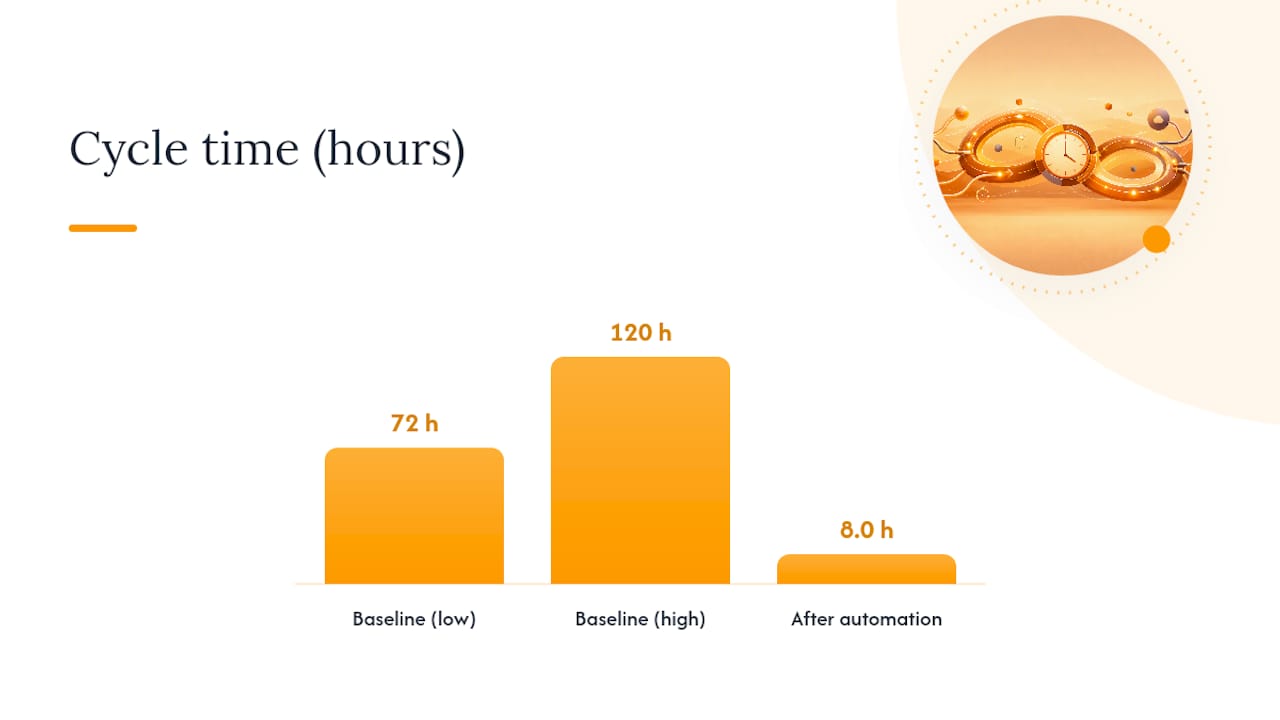
The payoff for getting this right is significant. In one empirical evaluation of a multi-agent orchestration framework across 78,773 operational events, teams cut average cycle time from an industry baseline of 72 to 120 hours down to 8.0 hours, while holding 65% task autonomy and 99.86% system stability. That's not a marginal gain. It's the difference between automation that saves a few minutes and automation that changes how a team ships.
Finally, checkpoint durable state, ideally in something like Postgres with pgvector, so a crashed run can resume and an auditor can reconstruct exactly what happened, when, and why.
How Do You Run a Pilot in 4 to 8 Weeks?
Don't try to automate everything at once. Pick a narrow, high-frequency workflow, prove it works, then expand.
- Scope to one to three recurring workflows. Good starting points: automated PR digests to Slack, PR-to-issue mapping in Linear, or running PR checks and summarizing failures.
- Build the minimum-safe architecture. Set up scoped OAuth connectors, isolate work with git worktrees, and require human approval for anything destructive (merges, deletes, force pushes).
- Define your metrics before you start. Track cycle-time reduction, task autonomy percentage, false-positive rate on automated actions, and actual engineer hours saved per week.
- Confirm operational readiness. A cost guardrail, observability hooks feeding your existing dashboards, and a clear escalation path when an agent gets stuck or misbehaves.
- Set acceptance criteria up front. For example: 30% cycle-time reduction on the target workflow, zero unapproved destructive actions, and a false-positive rate under 5% by week six.
Weeks one and two go to connector setup and worktree isolation. Weeks three through six run the pilot workflows live, with humans approving every consequential action. The final stretch is for tuning thresholds and deciding whether to expand scope.
Pro Tip: Treat the human approver in week one as a second agent with better judgment, not a rubber stamp. That framing, sometimes called Human-as-an-Agent, keeps a person actively decomposing edge cases instead of passively clicking "approve," and it's the fastest way to catch a bad pattern before it repeats fifty times.
What Types of SEO Automation Tools Exist, and What Do They Actually Automate?
In the engineering context, "automation tool" splits into a few distinct categories, and confusing them leads teams to buy the wrong thing entirely.
Single-purpose bots handle one job well: a Slack bot that posts deployment status, a GitHub Action that labels stale PRs. They're cheap and fast to set up, but every new workflow means writing another one-off script, and none of them share memory or context with each other.
Workflow orchestrators coordinate multiple steps across tools, often triggered by a webhook or a schedule. They're a step up in capability but usually stop at the orchestration layer. They don't reason about the task, decompose it, or adapt when something unexpected happens.
Multi-agent operating systems are the category built for this problem. A lead agent breaks a goal into tasks, assigns them to specialized workers running inside isolated containers, and retains context across runs so the system gets better at your specific codebase and conventions over time. This is the category agent-swarm's orchestration comparison covers in more depth, including how it differs from simpler workflow tools.
The primary use cases split cleanly by category. Single-purpose bots fit narrow, unchanging tasks. Orchestrators fit multi-step but predictable pipelines. Multi-agent operating systems fit the messy, high-variance work that engineering and operations teams actually deal with daily: triaging PRs, mapping issues across GitHub and Linear, and keeping Slack informed without a human copying and pasting status updates all day.
How Should Cross-Functional Teams Collaborate Inside an Automation Platform?
Engineering, product, and operations rarely share a single tool of record, which is exactly why automation platforms need to meet each team where it already works instead of forcing a new interface on everyone.
A platform that posts updates into existing Slack channels, opens Linear issues with the right labels, and comments on GitHub PRs in context requires zero retraining. Product managers see task status in Linear without learning a new dashboard. Engineers get PR feedback where they already read it. That's a meaningfully different experience from a standalone automation dashboard that only the platform team ever opens.
Approval workflows matter just as much as notification routing. When an agent proposes a destructive action, the request should land with the person who actually owns that decision, whether that person is an engineering lead approving a merge or an ops manager approving a production deploy. Routing every approval to one overloaded gatekeeper defeats the purpose of automation.
Shared context across roles is the underrated piece. When an agent's memory of a project persists and compounds, a product manager asking "what's the status of the Q1 migration" gets an answer informed by the same context an engineer would see, not a stripped-down summary. That consistency is what makes cross-functional teams trust an automated system enough to stop double-checking it manually, which is the whole point of automating in the first place.
Can Automation Platforms Scale and Customize for Engineering-Specific Workflows?
Scalability in this context isn't about handling more traffic. It's about handling more concurrent agents, more repositories, and more custom rules without the system falling over or requiring a rewrite.
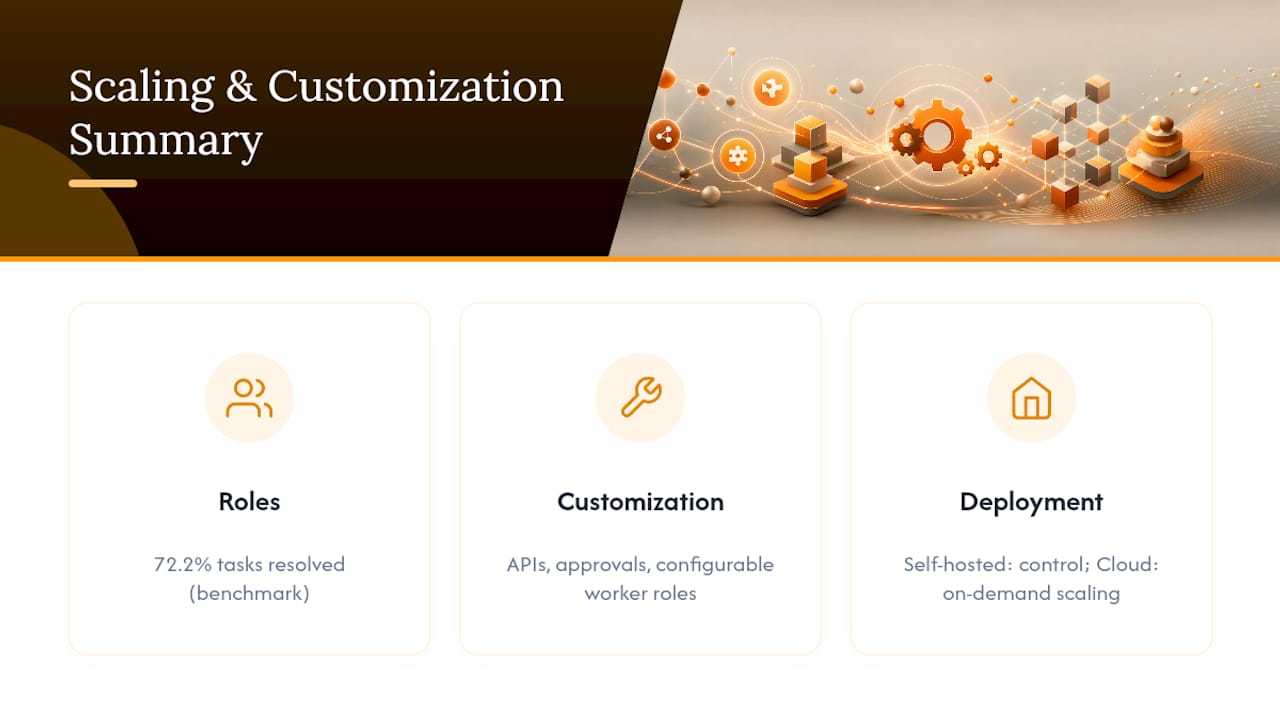
Role specialization is the architectural answer. Rather than one monolithic agent trying to do everything, teams get better results from specialized roles, a manager, a researcher, a developer, a reviewer, coordinating through a lead. Research modeling software engineering as a team structure found that this kind of role-specialized, manager-coordinated approach resolved 72.2% of tasks on a standard software engineering benchmark, with isolated sandboxes preventing agents from interfering with each other's work. That's a meaningfully different outcome than throwing every task at a single generalist agent.
Customization shows up in a few concrete places: custom API integrations beyond the standard GitHub/Slack/Linear trio, configurable approval thresholds per team or per repository, and the ability to define new worker roles as your workflows evolve. A platform locked to a fixed set of integrations will hit a wall the moment your operations team wants to pull data from an internal tool nobody anticipated.
The deployment model affects scalability too. Self-hosted deployments give you full control over resource allocation and data residency, which matters for regulated industries. Cloud-hosted deployments scale worker count on demand, which matters more for teams that would rather not run their own container infrastructure. Neither is universally better; the right choice depends on how much operational overhead your team can absorb versus how much control you actually need.
Why Multi-Agent Orchestration Only Works When Humans Stay in the Loop as Agents
The conventional pitch for AI automation treats humans as a bottleneck to minimize: fewer approvals, fewer check-ins, more autonomy. That framing gets the value proposition backwards.
Treating a human as an agent, someone actively decomposing tasks and validating plans rather than passively approving them, produces better outcomes than either full autonomy or heavy-handed gatekeeping. The evidence for role-specialized teams, where a manager coordinates researcher, developer, and reviewer agents, points the same direction: coordination overhead drops when responsibilities are clear, whether the "agent" doing the coordinating is a model or a person.
That said, multi-agent orchestration is overkill for a five-person startup running one repository. If a single script can poll GitHub and post to Slack reliably, don't build a fleet of specialized agents to do the same job. Complexity should scale with the number of workflows and the cost of getting one wrong, not with how sophisticated the tooling looks in a demo.
— Ez.-
Try agent-swarm.dev: Where It Fits the Evaluation Checklist
If you've been running through the checklist above—connectors, isolation, provenance, human approval gates—one platform built around exactly that list uses a lead agent to break objectives into tasks and assigns them to specialized workers running in isolated containers, enabling context and shared memory to compound across runs instead of resetting every session.
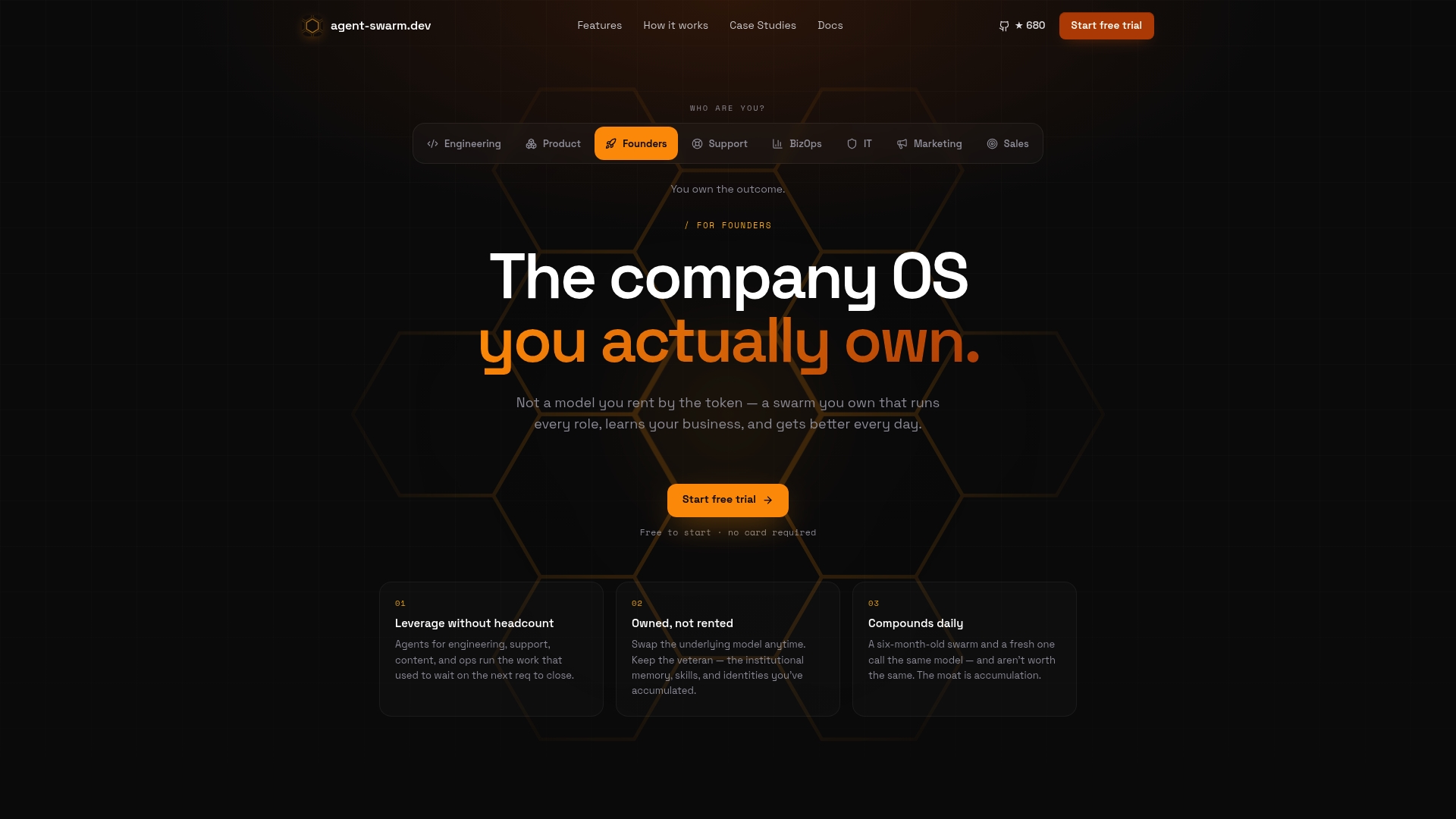
The connectors cover GitHub, Slack, Linear, and many other platforms, with self-hosted and cloud deployment both available depending on control needs and compliance requirements. If you're weighing this against a workspace-style approach or a lighter agent framework, the Cloudflare OS comparison and CrewAI comparison walk through where each shape fits best. The fastest way to see it working is to run through the live example sessions, which show real GitHub automation and multi-agent handoffs end to end, no setup required to watch how it behaves before you commit engineering time to a pilot.
Sources
- SEF: A Multi-Agent Orchestration Framework for Parallel SDLC Execution
- Human-as-an-Agent model (arXiv preprint)
- Build a DevOps Assistant Agent: GitHub, Linear & Slack (Scalekit)
FAQ
What Makes a Tool Count as an SEO Automation Platform for Engineering Teams?
In this context, it's a multi-agent workflow operating system that automates recurring engineering tasks, PR triage, issue mapping, Slack reporting, across GitHub, Slack, and Linear, with persistent memory and audit trails rather than one-off scripts.
How Long Should a Pilot Take Before Deciding to Scale?
Plan on four to eight weeks: two weeks for connector and worktree setup, four weeks running the pilot workflows live with human approval gates, and the remainder for tuning thresholds against your acceptance criteria.
Is Self-Hosting or Cloud SaaS Better for a First Pilot?
It depends on your compliance needs. Self-hosting gives full data control and is free to deploy as open source, while cloud SaaS trades some control for faster setup and on-demand worker scaling.
Does agent-swarm.dev Support GitHub, Slack, and Linear Natively?
Some platforms integrate with GitHub, Slack, Linear, and many other platforms, with example sessions demonstrating GitHub automation and multi-agent handoffs.
What's the Biggest Mistake Teams Make When Piloting Automation?
Scoping too broadly. Trying to automate an entire engineering workflow at once, instead of one to three narrow, high-frequency tasks, is the most common reason pilots stall before producing measurable results.
Recommended
Related field notes
TasteLabs Found Design Drift in Our Own Sites
Our landing sites had three amber ramps, 34 untokenized brand-color literals, and no BRAND.md files. One fix PR has merged; one is still open.
Políticas de acceso IA para equipos de ingeniería
Diseña políticas de acceso para IA que funcionen: cuatro elementos esenciales para trazabilidad y seguridad, con identidades no humanas y registros.
Roles y permisos en agentes de IA: la base de un despliegue seguro
Asegura agentes de IA con roles y permisos: limita accesos, aplica mínimo privilegio, políticas como código y registro de auditoría verificable.