Product managers: Orchestrate Product Management Automation in a 6‑Week Pilot
A practical playbook for product managers to pilot product management automation. Start with three safe automations and run a 6‑week pilot that treats PMs...

Start with three automations: research synthesis, PRD drafting, and recurring status reports. These carry the best ratio of setup effort to time saved, and they fail safely when something breaks. Nothing here works without two gating pieces in place first, persistent product memory and a defined human review cadence, both covered in the toolkit and playbook sections below.
TL;DR:
- Automations should start with low-risk, highly repetitive tasks like recurring reports or feedback routing, which validate infrastructure before handling strategic work.
- Building persistent product memory is essential to prevent agents from losing context between runs and ensure reliable, scalable automation workflows.
- Automations that require reasoning across many sources or memory of prior decisions should use agent orchestration platforms, while simple, scheduled tasks suit low-code or prompt-based systems.
- Implementing a clear review cadence and logging for every automated task helps prevent drift from strategy and maintains human oversight throughout the automation lifecycle.
- Begin with small pilots, such as the recurring report loop, and iterate based on real data and feedback to expand automation safely and effectively over time.
Table of Contents
- What Is Product Management Automation, Exactly?
- The Prioritized Playbook: What to Automate First
- Integrations, Product Memory, and Orchestration Patterns
- Governance, Review Cadence, and Monitoring
- A 6-Week Starter Roadmap to Implement Automation
- Why agent-swarm.dev: How an Agent OS Implements These Patterns
- Author Perspective: Start Small, Review Often
- Getting Started With agent-swarm for Your Team
- Sources
- FAQ
What Is Product Management Automation, Exactly?
Product management automation means using large language models, low-code pipelines, and multi-agent systems to handle the repetitive cognitive work of the job, synthesizing research, drafting specs, updating roadmaps, and generating reports, so PMs spend more time on judgment calls and less on transcription. It's the practical arm of what IBM describes as generative AI transforming product development by automating research synthesis, ideation, and repetitive QA work, freeing product teams to operate as orchestrators rather than assembly-line workers.
That word, orchestration, matters more than "automation" itself. A PM who automates a task still owns the outcome. The tools just change what "doing the work" looks like day to day.
The core toolkit breaks into four categories, each suited to a different kind of task:
- LLMs and prompt chains (ChatGPT, Claude, Gemini): best for one-off synthesis, drafting, and reasoning tasks where you're in the loop the whole time, like turning ten interview notes into three personas.
- Low-code automation platforms (Zapier, Microsoft Power Automate): best for scheduled, repeatable pipelines with predictable inputs, a weekly digest pulled from Linear and posted to Slack, for instance. Microsoft's own documentation on desktop flows walks through exactly this kind of pattern setup.
- Agentic orchestration platforms (agent operating systems): best for multi-step work that needs memory across sessions and coordination between specialized sub-tasks, like processing forty support tickets, tagging themes, and drafting a PRD section from the results.
- Analytics connectors (Amplitude, Mixpanel, product data warehouses): best for feeding quantitative signal into prioritization scoring, not for generating text.
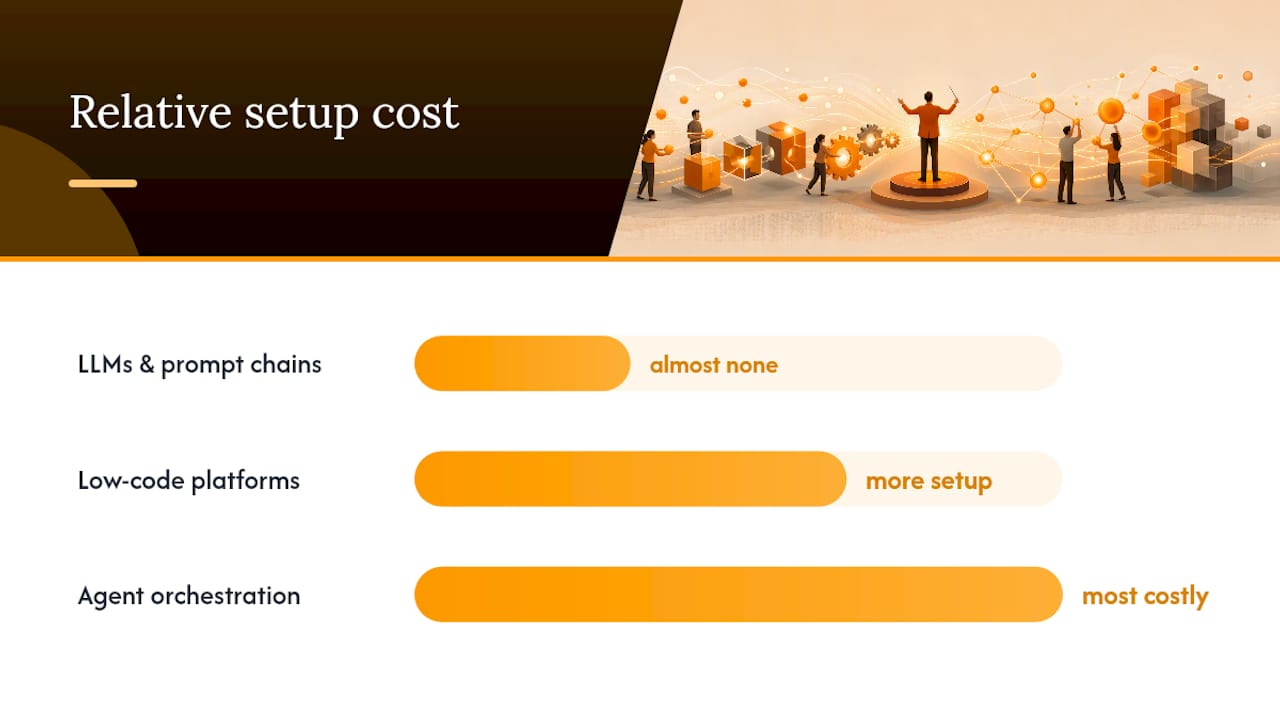
The trade-offs run in a predictable direction. LLM prompting costs almost nothing to start but requires you to babysit every run. Low-code platforms cost more setup time but run unattended once built. Agent orchestration systems cost the most in initial configuration, connector work and memory indexing, but scale to tasks no prompt chain or scheduled flow can handle alone, tasks that need to read across dozens of sources and hold context between steps.
A rule of thumb: if the task is a single lookup or draft, use an LLM directly. If it repeats on a schedule with the same structure, build a low-code flow. If it needs to reason across many documents and remember prior decisions, that's agent territory.
The Prioritized Playbook: What to Automate First
Not every workflow deserves the same automation investment. Some are low-risk plumbing you can hand off almost immediately. Others touch strategic judgment and need a slower rollout with tighter review. Here's the order that tends to work, ranked by risk-adjusted payoff rather than by how impressive the demo looks.
Discovery and research synthesis. Feed customer call transcripts, support tickets, and survey exports into an agentic system that clusters themes and drafts opportunity maps. Agentic product systems built for this, as Pm documents, can process many sources in parallel and hold that context in a structured, queryable form instead of losing it between sessions. A PM who used to spend a full day tagging forty interview transcripts can get a first-pass theme map in under an hour, then spend the saved time validating the clusters instead of building them by hand.
Customer feedback synthesis and routing. This is a lighter version of the above, running continuously rather than on demand. Set an automation to tag incoming feedback by theme and severity, then route the top clusters to the right Slack channel or Linear project automatically. The win here isn't depth of analysis, it's speed of triage. A recurring loop like this belongs in low-code territory once the tagging logic is proven, since the inputs are structured and the pattern repeats weekly.
PRD and spec autopilot. This is where agentic systems earn their setup cost. Instead of one draft, have the system generate three parallel strategic approaches to a feature, run each through a lightweight multi-perspective review (engineering feasibility, user impact, effort estimate), and export the winning direction directly into ticket fields. Plugins built for this exact job, like the Product Management plugin for Claude, show how natural-language prompts can generate PRDs and roadmap updates without a PM retyping the same structure fifty times a quarter.
Roadmap and prioritization scoring. Automate the scoring layer, not the decision layer. Feed evidence signals, support ticket volume, sales requests, usage drop-off, into a scoring model that ranks candidate features and updates a roadmap view automatically. Keep the final call human. The value here is surfacing signal you'd otherwise miss buried in a spreadsheet, not replacing the tradeoff conversation.
Recurring reports and stakeholder updates. Executive decks, release notes, and standup digests are the easiest wins on this list precisely because they're low-stakes and highly repetitive. Automate the pull, the formatting, and the distribution. Keep a human skim before it hits an exec's inbox for the first few cycles.
Pro Tip: Don't start with PRD autopilot, even though it's the flashiest. Start with the recurring report loop. It has almost no downside if it breaks, and it teaches your team how the automation behaves before you trust it with strategic drafting.
The logic behind this order is simple: low-risk administrative loops validate the plumbing, integrations, permissions, formatting, before you hand anything judgment-heavy to an agent. Once a report pipeline runs clean for a month, expanding into research synthesis or PRD drafting is a much smaller leap of faith than starting there.
Integrations, Product Memory, and Orchestration Patterns
Every automation above depends on one unglamorous piece of infrastructure: persistent product memory. Without an indexed, queryable record of what's in Notion, Jira, your docs, your analytics platform, and past interview transcripts, an agent has to re-request context on every single run. That's the failure mode that quietly kills most early automation attempts, not bad prompts, but agents that forget what they learned yesterday.
Building this out involves a few concrete design choices:
- Connector pattern: polling (checking a source on a schedule), webhooks (the source pushes updates as they happen), direct API calls, or MCP-style connectors that standardize how an agent reads and writes across tools. Webhooks tend to beat polling for anything time-sensitive, since polling introduces lag and wastes calls checking sources that haven't changed.
- Indexing scope: decide upfront what gets indexed into memory (interview transcripts, PRDs, ticket history) versus what stays a live lookup (real-time analytics dashboards). Indexing everything is expensive and slow; indexing nothing means the agent starts from zero every time.
- Orchestration pattern: a lead agent decomposes a broad objective into smaller tasks and assigns them to specialized workers running in parallel, each handling one slice, tagging tickets, drafting a section, checking a fact, then reporting back. Checkpointing after each step and automatic retries on failure keep one broken sub-task from silently corrupting the whole run.
Deciding between low-code, an agent operating system, or a custom engineering pipeline usually comes down to three questions: does the task need memory across multiple sessions, does it need to coordinate more than one type of sub-task at once, and how much engineering time can you actually spend maintaining it. If the answer to the first two is no, low-code wins on cost. If either is yes, an agentic orchestration approach is worth the setup investment.
Governance, Review Cadence, and Monitoring
Treat every automated agent like a junior teammate on their first ninety days: give it clear ownership of specific tasks, a defined review cadence, and acceptance tests it has to pass before its output ships unreviewed. Practitioners consistently flag that automation without a human-in-the-loop review loop drifts from strategy fast, since nothing catches the moment an agent starts optimizing for the wrong signal.
A few operational habits keep that drift from happening:
- Log every automated action with a timestamp and the input that triggered it, so you can trace back exactly why a PRD section or a routed ticket looks the way it does.
- Version your product memory the same way you'd version code, so a bad index update can be rolled back instead of silently corrupting future runs.
- Track KPIs that actually reflect the automation's job: time saved per cycle, cycle time from ticket to shipped feature, error rate in generated drafts, and stakeholder satisfaction with the reports they receive.
- Escalate autonomy in controlled stages. Let an agent draft a report for review before you let it draft a report for direct distribution.
Pro Tip: If you're not sure how many agents a workflow actually needs, resist the urge to add more. Most over-engineered automations fail from too much agent density, not too little, coordination overhead eats the time savings you were chasing.
A 6-Week Starter Roadmap to Implement Automation
Running a real pilot beats reading ten more articles about this. Here's a rollout that fits inside a single quarter and produces a measurable answer either way.
- Week 1: inventory and access. List every data source you'd need for your pilot loop, Slack, Jira or Linear, Notion, your analytics tool, and secure API or integration access for each. Pick one pilot loop, ideally the recurring report digest, since it's the lowest-risk starting point covered above.
- Weeks 2 to 3: build the MVP. Construct the automation with a narrow scope, one report type, one distribution channel, and run smoke tests against real historical data before it touches a live audience.
- Week 4: run the pilot. Let it operate for a full cycle. Collect both hard metrics (time saved, error count) and qualitative feedback from the stakeholders receiving the output.
- Weeks 5 to 6: iterate and expand. Add a human review gate wherever the pilot revealed a gap, fix what broke, and scope the next automation candidate, likely feedback routing or research synthesis, based on what you learned.
Checklist before you call the pilot done: data hygiene confirmed (no duplicate or stale sources feeding the pipeline), permissions scoped correctly, a rollback plan documented, and success metrics defined before, not after, the first run. Teams that map these admin loops into concrete, executable specs, the kind BYOBot's workflow automation examples walk through for PM tasks specifically, tend to hit a working pilot faster than teams that try to design the perfect system upfront. Starting with a scheduled, low-code automation before building a full agentic layer is also the sequencing IBM's research on generative AI's product implications points to, it proves value cheaply before you invest in orchestration.
Why agent-swarm.dev: How an Agent OS Implements These Patterns
Everything in this playbook, parallel research synthesis, PRD drafting, recurring report distribution, depends on the same underlying architecture: a coordinator that breaks work into tasks, specialized workers that execute them, and memory that persists between runs. That's the exact design agent-swarm runs on.
A lead agent decomposes a broad objective (say, "synthesize this quarter's support tickets into a PRD draft") into smaller tasks, then assigns each to a specialized worker, running Claude Code, Codex, or OpenCode, inside an isolated container. Shared memory compounds across runs instead of resetting each time, which is precisely the scaling factor the playbook above depends on.
Where this maps directly onto the workflows already covered:
- Research synthesis and feedback routing run as parallel worker tasks feeding into one shared memory store.
- PRD autopilot and roadmap updates hand off directly to Linear or Jira through native integrations.
- Release notes and standup digests distribute through Slack without a human copying and pasting between tools.
- GitHub integration keeps engineering-facing automations, like PR review agents, auditable alongside product-facing ones.
Teams can self-host the MIT-licensed version or run it as a cloud-hosted subscription, with case studies like Capchase's deployment showing how the pattern plays out in a real cross-functional workflow.
Author Perspective: Start Small, Review Often
The real shift here isn't tooling, it's mindset. Product management is moving from documentation toward orchestration, where the job becomes defining preference models and deciding what to delegate, a change IBM's research on generative AI in product development frames well. That's a harder skill than writing a good PRD, and most teams underinvest in learning it.
My caution: automation is not set-and-forget. The teams that get burned treat their first agent like a finished hire instead of a junior teammate who needs a review loop for months, not days. Pick one admin loop, the report digest, not the PRD generator, and run it badly for a few weeks before you trust it with anything strategic. The gap between what these tools promise and what they deliver closes fast once you actually watch one run.
— Ez.-
Getting Started With agent-swarm for Your Team
Some agent operating systems give PMs an orchestration pattern similar to what this playbook describes, breaking objectives into tasks handled by specialized workers running in isolated containers, with shared memory persisting across runs to prevent loss of context when a session ends.
If you're weighing an agent operating system against a lighter workspace tool, the Cloudflare OS comparison breaks down where a coordinated swarm outperforms a simple task queue. The best entry point matches what this article recommends starting with: a research synthesis loop or a PRD autopilot pilot, both mapped directly onto agent-swarm's lead agent and worker model. Browse the case studies to see how other teams scoped their first automation, then set up a pilot with your own data sources this week.
Sources
- AI in product development — IBM Think
- Human-in-the-loop AI — Product School
- Install and configure Power Automate desktop flows — Microsoft Docs
- Pm
- Product Management plugin | Claude
FAQ
What Are the Core Skills Product Managers Need for Automation?
The top skills shift toward orchestration: defining clear preference models for agents, reviewing AI-generated output critically, and knowing when a task needs full automation versus a human draft. Prompt writing and data literacy matter, but judgment about what to delegate matters more.
Is Product Management Being Replaced by AI?
No. AI automates repetitive synthesis, drafting, and reporting tasks, but strategic tradeoffs, stakeholder alignment, and prioritization judgment stay human. IBM's research frames this as PMs shifting toward orchestration roles rather than being replaced outright.
What Are the Stages of the Product Lifecycle Automation Can Touch?
Automation applies across discovery, definition, planning, development handoff, launch, and post-launch monitoring, with the strongest early wins in discovery synthesis and recurring reporting rather than final launch decisions.
How Do I Start Automating Product Management Workflows?
Start with one low-risk, high-repetition loop, a recurring report or feedback tagging pipeline, before building toward research synthesis or PRD drafting. A platform like agent-swarm's lead agent and worker model handles the coordination once you're ready to scale past a single automation.
What's the Biggest Risk in Adopting Product Management Automation?
Treating automation as set-and-forget. Without a defined review cadence and persistent product memory, agents lose context between runs and drift from strategy, which is why human-in-the-loop review stays essential at every stage.
Recommended
Related field notes
Memory vs Context Window: 4 Steps to Measure MECW, Build Tiered Memory
Practical playbook for engineers: measure your model’s MECW, avoid quadratic attention costs, and deploy a tiered retrieval memory system in four clear...
Patrones y dimensionado: autohospedaje de agentes para ingenieros
Cómo autohospedar agentes: patrones de sesión, fórmulas de dimensionado, checklist operativa y seguridad. Ejemplos en agent-swarm.dev
De horas a minutos: triage de tickets IA para soporte e ingeniería
Plan operativo para implantar triage de tickets con IA en colas reales: diseño del flujo, umbrales, riesgos y lista para líderes de soporte.