Pick Best AI Workflow Automation That Preserves Memory for Engineers
Engineering first guide to AI workflow automation: pilot plan to prove ROI and why agent-swarm.dev fits teams needing persistent memory.

For engineering-led teams that need multi-agent orchestration, persistent memory across projects, and the freedom to self-host or run in the cloud, agent-swarm.dev is the strongest fit on the market right now. It wins on architectural control and shared memory that compounds instead of resetting per session. If your team is non-technical and just needs simple approval chains or a marketing form-to-CRM handoff, a low-code builder or managed cloud suite will get you there faster.
TL;DR:
- Self-hosted agent operating systems like agent-swarm provide persistent shared memory and control over infrastructure, ideal for regulated data residency needs.
- Evaluation should prioritize platform model flexibility, deep integration capabilities, and end-to-end observability to manage costs and technical risks effectively.
- Deployment costs depend heavily on token usage, concurrency needs, and human-review time, requiring detailed forecasting and separate tracking of usage and labor expenses.
- Robust security and governance controls, including prompt logging, immutable audit trails, and fine-grained RBAC, are essential to prevent model misuse and ensure compliance.
- Running a targeted, measurable pilot over four to eight weeks with clear success metrics and continuous artifact collection is key to proving ROI before full deployment.
Table of Contents
- What Class of Best AI Workflow Automation Fits Your Team?
- What Should a 2026 Evaluation Checklist Include?
- Self-Hosted, Cloud, or Hybrid: Which Deployment Fits?
- What Security and Governance Controls Should You Require?
- How Do You Run a Pilot That Actually Proves ROI?
- What Actually Turns Automation Into Measurable ROI?
- Why agent-swarm.dev Fits Engineering Teams Running Real Pilots
- Sources
- FAQ
What Class of Best AI Workflow Automation Fits Your Team?
Before touching a demo, figure out which category you actually need. Most procurement cycles waste weeks trialing tools that were never built for the job at hand, and the fastest way to avoid that is matching your team's technical depth and use case to one of four broad categories.
Open-source, self-hosted agent operating systems. These give engineering teams a lead agent that decomposes objectives into tasks, hands them to specialized workers running in isolated containers, and retains context across runs. Pick this category when data residency matters, when you have engineers who can own infrastructure, and when you want to switch underlying models (Claude, GPT, open-weight models) without rebuilding your automation logic.
Hybrid or cloud orchestration platforms. These sit between full self-hosting and turnkey SaaS, often letting you run workflow logic in the cloud while keeping sensitive data behind your own connectors. They suit teams with moderate technical capacity that want faster time-to-value than self-hosting but more control than a pure no-code tool offers.
Low-code and no-code automation builders. Visual, drag-and-drop platforms designed for citizen developers. Microsoft's Power Automate is the reference example here, pairing prebuilt connectors with Copilot-assisted flow generation. Pick this category when the workflows are simple, approval-based, and owned by business teams rather than engineers.
Governance-first enterprise suites. Built around compliance, audit trails, and centralized policy enforcement rather than raw orchestration flexibility. These fit regulated industries (finance, healthcare, insurance) where a compliance team, not an engineering team, drives the buying decision.
ROI timelines differ across these categories:
- Self-hosted agent operating systems: slower initial setup, but ROI compounds as shared memory and reusable skills accumulate across projects.
- Cloud orchestration: fast initial deployment, with costs scaling moderately over time.
- Low-code builders: often provide quick wins on simple flows but may plateau on complex workflows.
- Governance-first suites: typically slower to deploy but help mitigate risks in regulated workflows.
Before you shortlist anything, get three people in a room: the engineering lead who owns the workflow, a security or compliance stakeholder, and whoever controls the budget line. The first question to answer together isn't "which tool is best," it's "does this workflow need persistent context across runs, or is it stateless?" That single answer eliminates half the market.
What Should a 2026 Evaluation Checklist Include?
Vendor demos are theater. A real evaluation checklist forces vendors to show you the mechanics instead of the highlight reel, and in 2026 that checklist needs to cover seven areas that didn't matter nearly as much three years ago.
Architecture and model agnosticism. Can the platform swap the underlying LLM without you rewriting your workflow definitions? Model-agnostic platforms that support bring-your-own-model endpoints let you route cheaper models to routine tasks and reserve frontier models for complex reasoning, which matters enormously once your token bill starts climbing. Enterprise adoption research from ISG's 2025 state of enterprise AI adoption report identifies model portability as a top procurement driver, not a nice-to-have.
Integration depth. Count the connectors that matter to you specifically, not the total number a vendor advertises. A platform with 400 shallow integrations and no deep Slack or GitHub hooks is worse than one with 40 connectors that actually support bidirectional sync and webhook triggers.
Observability and telemetry. You need end-to-end trace graphs across every LLM call, tool invocation, and human approval step, plus token-level cost attribution per workflow stage. Without this, you cannot find your actual cost or reliability bottlenecks, only guess at them.
Security and governance. Prompt logging, immutable audit trails, and role-based access control (RBAC) are baseline requirements, not premium add-ons, according to Tech Daily Shot's 2026 guide on evaluating AI workflow automation security.
Testability and portability. Ask whether workflow definitions can be exported, version-controlled, and tested outside the vendor's runtime. If the answer is no, you've found vendor lock-in dressed up as convenience.
Cost controls. Look for per-workflow budget caps, alerting on token spend spikes, and the ability to throttle concurrent agent runs.
Procurement red flags. According to Tech Daily Shot's vendor evaluation framework, the clearest warning signs are closed APIs, no exportable audit logs, and an unwillingness to share reproducible latency benchmarks.
Vendor evaluation guidance increasingly treats reproducible latency benchmarks, including median and tail response times, as important evidence rather than optional information, according to Tech Daily Shot.
During any demo, request specific evidence instead of accepting a slide deck:
- A sample of exportable audit logs, not a screenshot of the audit log feature.
- Latency numbers at P95 and P99, not just the median case the vendor prepared for.
- Access to their own test harness or an equivalent showing how they validate agent behavior before production.
- A live RBAC example showing how a permission change propagates to running workflows.
Pro Tip: Build your evaluation into a scored spreadsheet with ten rows, one per criterion above, and weight security and observability at double the value of ease-of-use. Ease-of-use fades after week two. Weak observability costs you every week after that.
The Best Workflow Orchestration Tools for AI Agent Teams breakdown goes deeper into orchestration-pattern trade-offs if you want to compare architectures side by side before you draft your own scoring template.
Self-Hosted, Cloud, or Hybrid: Which Deployment Fits?
Deployment choice is where most procurement teams underestimate the downstream cost. Get this wrong and you either overpay for capacity you don't use or hit a compliance wall six months into rollout.
Self-hosted deployment gives you full control over data residency and infrastructure, which matters if you operate in a regulated sector or simply refuse to send proprietary code and customer data through a third-party inference layer. The trade-off is that your team owns uptime, scaling, and container orchestration. Cloud-managed deployment, the kind Power Automate exemplifies, delivers fast time-to-value and a deep connector library, but it comes with vendor-managed model exposure and less say over exactly where your data sits. Hybrid setups split the difference: workflow logic runs in the cloud while sensitive data processing stays behind your own infrastructure boundary.
Here's how to estimate total cost realistically before you sign anything:
- Map token usage per workflow. Estimate average input and output tokens per run, multiply by expected monthly volume, and price it against your target model's rate card.
- Count concurrent agent slots you'll actually need. Most teams overestimate this during planning and underestimate it during peak load, so build in a 30 to 40 percent buffer.
- Price premium connectors separately. Some integrations (enterprise Salesforce, certain ERP systems) carry their own licensing cost on top of the platform fee.
- Add human-review time as a cost line, not an afterthought. Every workflow with a human-in-the-loop checkpoint consumes reviewer hours that need to show up in your ROI math.
- Request a 90-day cost trend, not a snapshot quote. Ask the vendor to model what happens to your bill if usage doubles, since that's the scenario that actually breaks budgets.
When a vendor sends a pricing proposal, push back until it separates seat-based fees from usage-based fees. A platform billed per active worker, like agent-swarm's cloud tier, behaves very differently under scale than one billed per API call, and conflating the two in your forecast will produce a number that's wrong in either direction. If data residency is non-negotiable for your legal team, get the self-hosting option's infrastructure requirements in writing before the pilot starts, not after.
What Security and Governance Controls Should You Require?
Security in AI workflow automation stopped being a checkbox exercise once agents started taking autonomous actions across production systems. The controls that mattered in 2023, basic access logging and a privacy policy, are no longer sufficient.
Runtime controls you should treat as non-negotiable include prompt logging on every agent interaction, immutable audit trails that can't be edited after the fact, and RBAC that scopes exactly which agents can touch which systems. Tech Daily Shot's 2026 security guide frames continuous auditing and zero-trust principles applied to agents themselves, not just human users, as the new baseline.
Governance signals go beyond the technical layer. You want a named owner for every deployed workflow, someone accountable when an agent misbehaves, plus continuous drift monitoring that flags when a model's output quality degrades over time. Weak governance is one of the most common causes of failed AI projects, according to Allata's 8-point governance framework, which recommends evaluating vendors on architectural guarantees like zero data retention and continuous monitoring rather than taking marketing claims at face value.
Enterprise governance guidance increasingly recommends continuous monitoring of accuracy drift and hallucination rate as ongoing signals rather than only a one-time audit before launch, according to Tech Daily Shot's security framework.
On the certification side, ask vendors directly whether they map their controls to SOC 2 Type II and reference ISO/IEC 42001 (the AI management system standard) in their compliance documentation. Neither certification guarantees a flawless system, but a vendor who can't speak fluently about either one probably hasn't built governance in at the architecture level.
Operational benchmarks worth including in any PoC:
- Mean time to detect (MTTD) a prompt injection attempt during adversarial testing.
- Hallucination rate under monitoring across a sample of real production-style tasks.
- Audit-log exportability, tested by actually pulling a log and checking whether it's usable outside the vendor's dashboard.
Red flags that should fail a vendor at the RFP stage: no answer on data retention policy, no RBAC granularity below "admin versus everyone," and any refusal to let your security team run adversarial prompt tests before signing. The AI Access Control for Agent Swarms governance blueprint walks through what granular RBAC should actually look like in a multi-agent environment, which is a useful reference point when a vendor's answer feels vague.
How Do You Run a Pilot That Actually Proves ROI?
A good pilot answers one question cleanly: does this platform reduce cost or review burden on a real recurring workflow without introducing new failure modes? A vague pilot that tests "AI capability in general" produces vague results that convince nobody.
Start by picking a workflow that's recurring, has a measurable current cost (in hours or dollars), and tolerates a human-review safety net without becoming pointless if reviewed every time. Good candidates: PR triage and labeling, recurring customer support ticket routing, or dependency update review across repositories.
- Define success metrics before you start. Set a target reliability rate (percentage of runs completed without human correction), a maximum acceptable human-review burden (hours per week), and a target cost per run. The READY framework for reliable enterprise agent deployment frames exactly this combination, reliability, oversight burden, and operating cost, as the core qualification criteria for production readiness.
- Assemble the right roles. Include the engineering owner of the target workflow, one security reviewer, and one end user who will actually consume the automation's output, not just the person who requested the pilot.
- Run the workflow in shadow mode first. Let the agent complete the task while a human still does it independently, then compare outputs before you trust the agent unsupervised.
- Introduce controlled failure scenarios. Feed it malformed inputs, edge-case tickets, or ambiguous instructions to see how gracefully it fails, not just how well it performs on the easy cases.
- Collect artifacts continuously. Save every audit trail, cost report, and reliability benchmark from day one so your final report doesn't rely on memory or a rushed retroactive analysis.
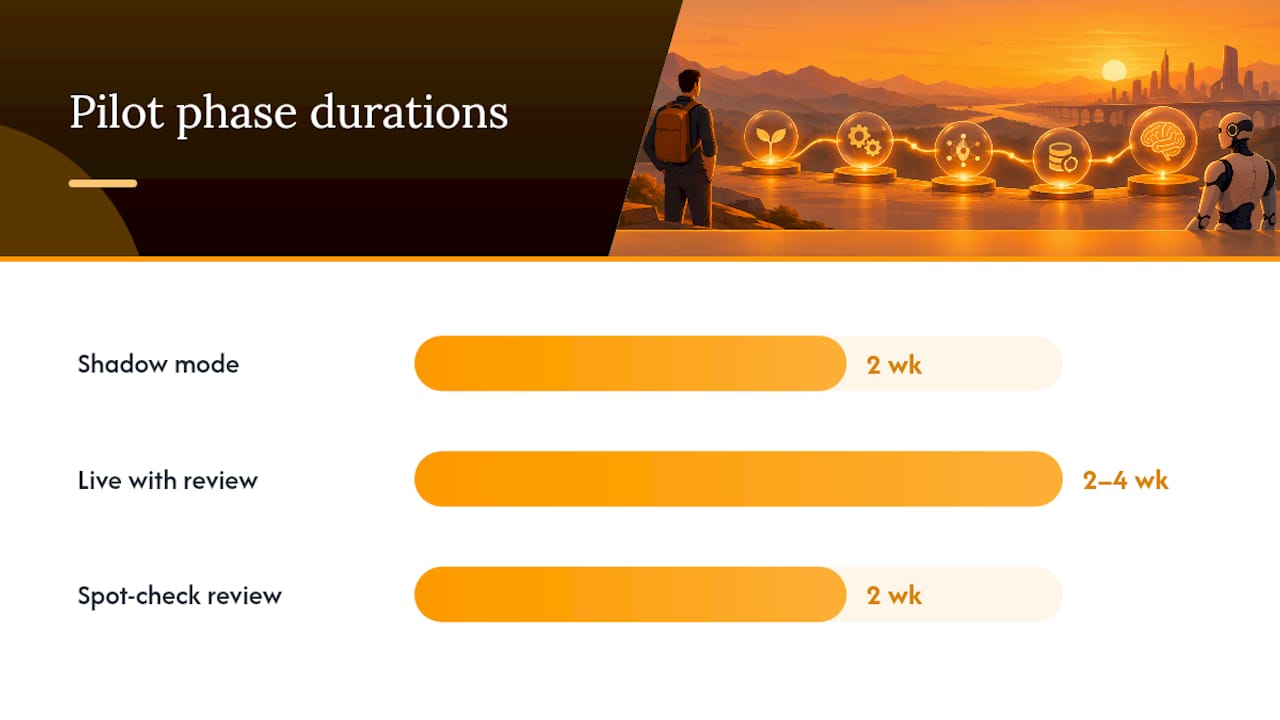
Run this over four to eight weeks: two weeks in shadow mode, two to four weeks live with human review on every output, and a final two weeks with spot-check review only if reliability holds steady. Acceptance criteria might look like: 90 percent of runs require no human correction, cost per run stays under your target threshold, and no security incident occurs during the full window.
Pro Tip: Track cost per run and human-review time separately, even though they're related. A workflow can hit its cost target while quietly consuming so much reviewer time that it never actually saves anyone a minute.
The Agentic Workflow Automation engineering guide covers pilot design patterns in more technical depth if your team wants a reference architecture before drafting the acceptance criteria document.
What Actually Turns Automation Into Measurable ROI?
Most teams that stall out on AI workflow automation don't fail because the technology is weak. They fail because they treat the rollout as an IT deployment instead of an organizational change, and that distinction shows up everywhere once you look for it.
The most common mistake is a governance gap: nobody owns the workflow once it's live. Engineering ships it, then moves on to the next sprint, and three months later nobody notices the model has drifted or the human-review queue has quietly ballooned. The second most common mistake is weak instrumentation. Teams measure whether the workflow "worked" in a binary sense but never track token cost per step or reliability trends over time, so when something breaks, nobody can point to where.
The ISG 2025 adoption report backs this up directly: organizations that treat AI strategy as a cross-organizational shift, combining real-time monitoring with adaptive feedback loops, are meaningfully more likely to reach measurable ROI than those that hand the whole thing to IT and check back in a quarter. That matches what shows up in every failed rollout postmortem worth reading. The fix isn't more dashboards. It's "data by design," building the telemetry into the workflow from day one, and "dynamic oversight," where a real person adjusts the human-review threshold as reliability data comes in, instead of setting a policy once and forgetting it.
The organizational change that actually produces ROI is smaller than most teams expect: name one owner per automated workflow, give that owner a weekly fifteen-minute review of the reliability and cost dashboard, and let them adjust the oversight burden as confidence in the workflow grows. Teams that skip this step end up with either overcautious automation that reviews everything forever, wasting the whole point of automating, or overconfident automation that nobody's watching until it breaks something in production. Companies that have paired automation with disciplined process change have seen substantial gains in speed on research-heavy workflows, according to a case study on AI-powered content workflows.
Why agent-swarm.dev Fits Engineering Teams Running Real Pilots
If the checklist above left you wanting a platform built specifically for the criteria that matter, agent-swarm.dev is designed around exactly that gap: engineering teams that need to own their automation instead of renting a black box.
agent-swarm is an open-source AI work operating system where a lead agent breaks objectives into tasks and assigns them to specialized workers running inside isolated containers. Shared memory and context compound across runs instead of resetting, which directly addresses the persistent-memory gap most orchestration tools leave open. It integrates with widely used collaboration and development tools, so pilot workflows like PR triage, dependency review, and ticket routing can connect to tools teams already use rather than requiring a separate interface.
Deployment matches whatever your evaluation checklist demands: run it fully self-hosted under the free, MIT-licensed model if data residency and infrastructure control are non-negotiable, or run the Cloud plan at published prices for hosted agent swarms without the operational overhead. Teams that need dedicated support and tailored integrations can move to the Enterprise package. Every tier keeps a model-agnostic architecture that lets you switch underlying models without losing the institutional memory your workflows have already built up. Compare it directly against a rented single-agent approach on the Manus comparison page, or see the full pricing breakdown and get a pilot running this week.
Sources
- 2025 ISG state of enterprise AI adoption report
- The Complete 2026 Guide to Evaluating AI Workflow Automation Security—Frameworks, Auditing, and Threats — Tech Daily Shot
- Power Automate copilot overview — Microsoft Learn
FAQ
Can AI Be Used for Workflow Automation?
Yes, AI now handles multi-step workflows that go beyond simple triggers, including document processing, agentic task orchestration, and retrieval-augmented reasoning across connected tools. Platforms like agent-swarm extend this further by letting a lead agent break objectives into tasks and delegate them to specialized workers with persistent memory across runs.
Which AI Model Is Best for Automation?
There's no single best model since performance depends on the task: reasoning-heavy steps benefit from frontier models, while routine classification or extraction runs cheaper on smaller models. Model-agnostic platforms let you route each task to the right model rather than locking you into one, which ISG's adoption research identifies as a major procurement driver.
What's Better Than n8n for Enterprise Automation?
For teams that need persistent memory, model portability, and multi-agent task decomposition rather than a visual flow builder, an open-source agent operating system like agent-swarm offers deeper orchestration and self-hosted control. The right fit depends on whether your team needs simple triggered flows or genuine multi-step agentic reasoning with shared context over time.
Is ChatGPT Still the Best AI for Workflow Tasks?
ChatGPT remains a strong general-purpose model, but it's not a workflow automation platform on its own. It works best as one interchangeable model within a broader orchestration system that adds task delegation, memory, integrations, and governance controls around it.
How Much Does agent-swarm Cost?
agent-swarm offers a free, self-hosted option under an open-source license, a Cloud plan priced from €30 to €100 per month, and an Enterprise tier with pricing available on request. Full details are on the pricing page.
Recommended
Related field notes
Open Source AI Orchestration: Best OSS Picks for 2026
Discover the best open source AI orchestration tools for 2026. Choose the right engine for robust production or rapid prototyping.
We Rebuilt Linear's “Loops updates” Clip as a Swarm Video in Eight Rounds
Three video models read Linear's motion-design teaser; the two Gemini models called the 3D scene 2D until 7.5s. A frame-by-frame check caught it. The replica is 858 frames of Remotion and three.js, reviewed eight times.
SEO con agentes IA: guía práctica para automatizar sin perder el control
Aprende a automatizar tareas SEO con agentes de IA sin perder el control: define reglas, supervisa aprobaciones y gana tiempo para estrategia.